Agentic AI engineering is an article series on running coding agents on real codebases: what I do, what the agents do, what worked and what didn’t. I wrote this for engineering leaders deciding whether to work this way, and the engineers who would. At the same time, I’m hoping you’ll have some ideas to share back so we can all learn together.
- Agentic AI engineering: I steer, the agents orchestrate (this post)
- What the humans do, what the agents do, and where the hard lines are
- Why instructions aren’t enough for coding agents
- Orchestrating coding agents across lanes without conflict
- Read-only by default: the MCP servers my coding agents may use, and the ones they may not
- Lessons learned running coding agents: what broke, what failed, and what changed
Overview
I remember the 2010s like it was yesterday. Code nights, figuring out complex problems at 2am, and the rush of building innovative things, like the product suites I spent a lot of time designing. I’m getting the same rush now, but with agentic AI engineering principles, and solving different problems.
Recently, most of the code in my evening and weekend projects has been written by coding agents, and I have been doing something else: steering. I decide what gets built and in what order, I answer the questions that come back, I review what lands, and I keep the rules the agents work under. Several agents run at once, each in its own lane of the codebase, and a small status page tells me at a glance who is doing what and what is waiting on me.
That is my definition of agentic AI engineering, and this series is about how it works in practice on real codebases: complex solutions and architectures on the Microsoft stack, .NET and Blazor on Azure, with Entra for identity and Microsoft Graph for the Microsoft 365 side. The tooling is Claude Code in VS Code, with a few MCP servers I’ll come back to in part 5. Evenings and weekends have gone into tuning the workflow while learning what works, and that workflow is the part I’ll try to convey in my blog posts. The screenshots are real sessions over a real backlog, pseudonymized, so names are replaced with placeholders.
Context
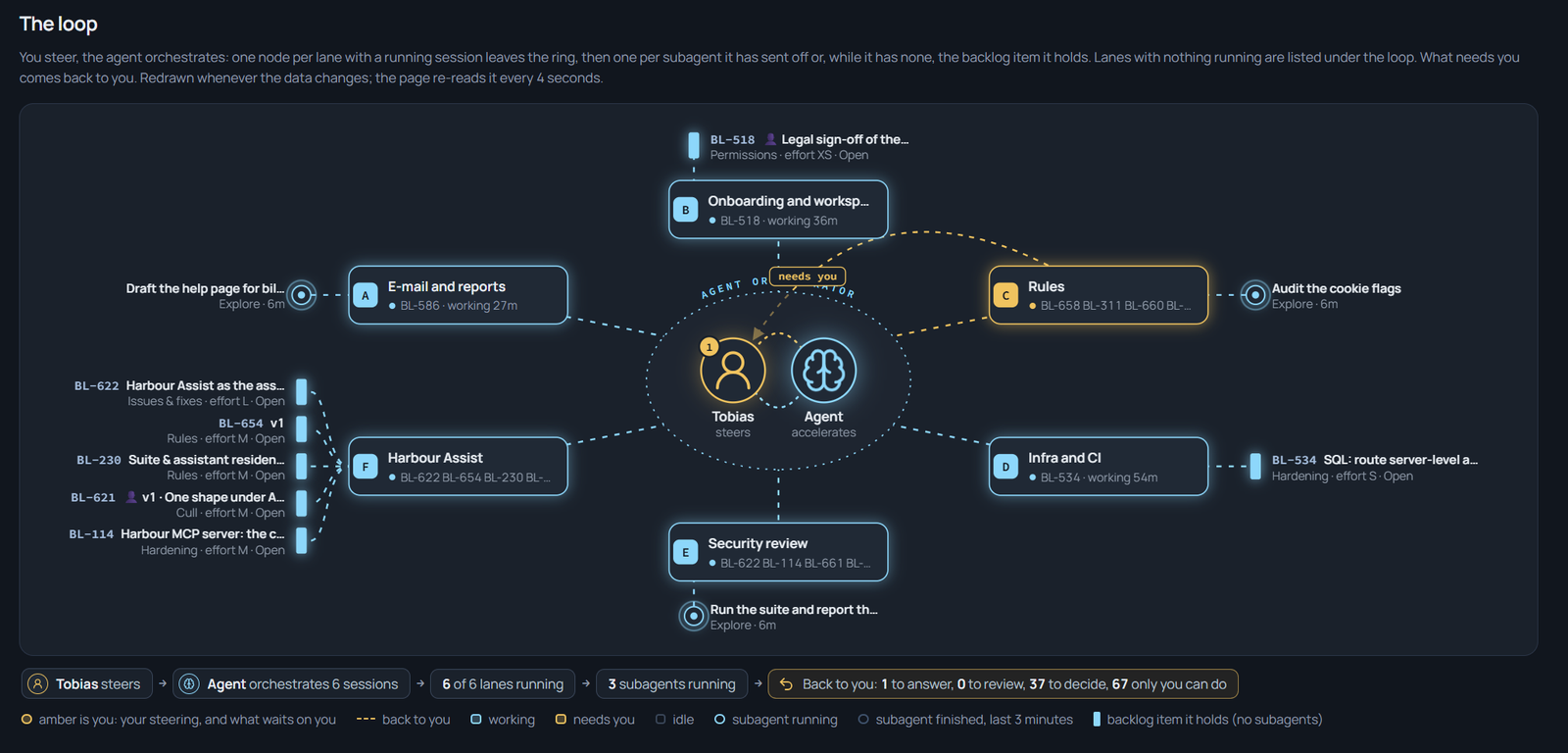 Six sessions around the ring, a sub-agent branching off one of them, and one line curving home to the amber disc with a badge. Something is waiting on me.
The picture above is what I look at most of the day. Each cyan node is a coding-agent session, one per lane. A session can branch into sub-agents for a review or a search, and those are drawn one step further out. When a session needs me, its line curves home to the amber disc in the middle, and the badge counts what is waiting. Amber is me, cyan is the agent, and that one visualization rule tells me where my attention is needed right now. If the ring is all cyan, I can go for a bike ride (not really, but kind of).
How it works
Simplified, the principle is that the agents own the work in progress (e.g., taking action on the tasks) and I own the direction, the rules, and anything irreversible. The setup that makes that work is a handful of markdown files and one page to visualize and direct me to where my attention is needed.
What changes, what doesn’t
What changed for me is the unit of work. I no longer sit down to write a function; I sit down to write a backlog item or spec and an agent can start from that without asking, which is a different skill (part 2 is about it). I read diffs, test output and proofs instead of code as it is typed. And the handover file, one markdown document every session updates when it finishes, has replaced my own memory of where things stand. Less is more, and this way, I offload my cognitive requirements to where it matters: making the right decisions, analyzing the outcomes, and reviewing with rigor.
What did not change: the architecture is mine and written down, the build and the test suite are the gate for everything, nobody commits unless I ask, and nothing reaches a live environment without my hands on it. The agents are fast, and the things that must stay slow stay with me. While I’ll mention test suites later, one thing to make note of is that I’ve got some agents working on writing tests and code, but I use different models and agents to verify and run the verification and code reviews, so it’s not the same ‘developer’ pushing both the test, the code, and verifications.
A day with the agents
So a day, or in this case weekend or evening, I grab a cup of coffee ☕ and start in the handover file. It lists the lanes, what each lane’s queue holds, and what waits on me. I start one session per lane, and each session reads the same three things before it touches a file: the rules file at the root of the repository, which is always in force; the handover; and the head of its lane’s queue in the backlog. The claim it makes is one line in the handover, so every other session can see the lane is taken:
Session: lane-d-14 · BL-5xx the deploy workflow's what-if mode · since this morningFrom there the agents run and I watch the board intermittently. Under the ring there are four counts: Answer, Review, Decide, Do. Answer is a question an agent cannot settle from the code. Review is a diff or a proof it wants my eyes on. Decide is a real fork in what gets built, which an agent is never allowed to settle quietly. Do is something only a human can do: a sign-in, a DNS record, a look in a real browser (although I also use Playwright for most of that). Those four lists are my inbox for the fleet of agents across projects.
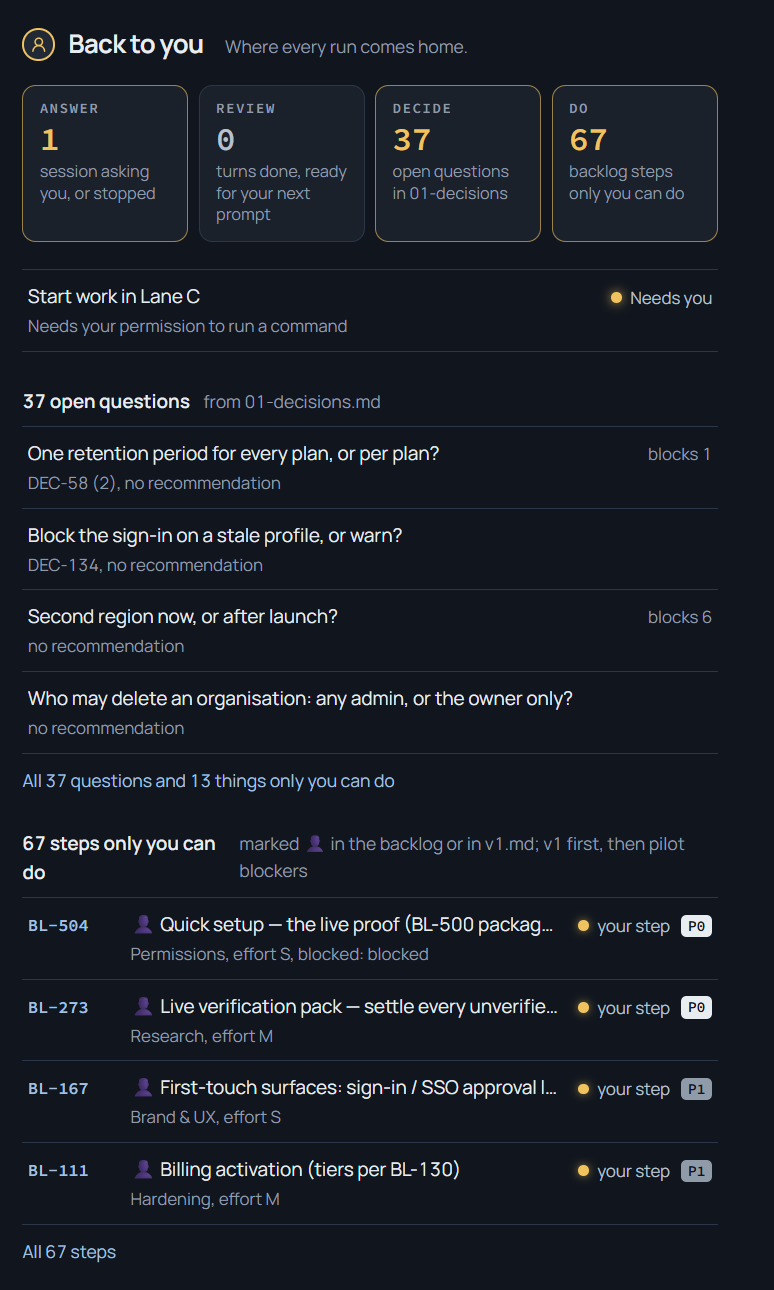 The four counts under the ring, and the lists under them. Everything with a person icon waits on me.
Below the counts sits the wall: one row per workstream and one stake per backlog item, solid where the work is done, half where it is in progress, hatched where it is blocked, with an amber cap on whatever waits on me.
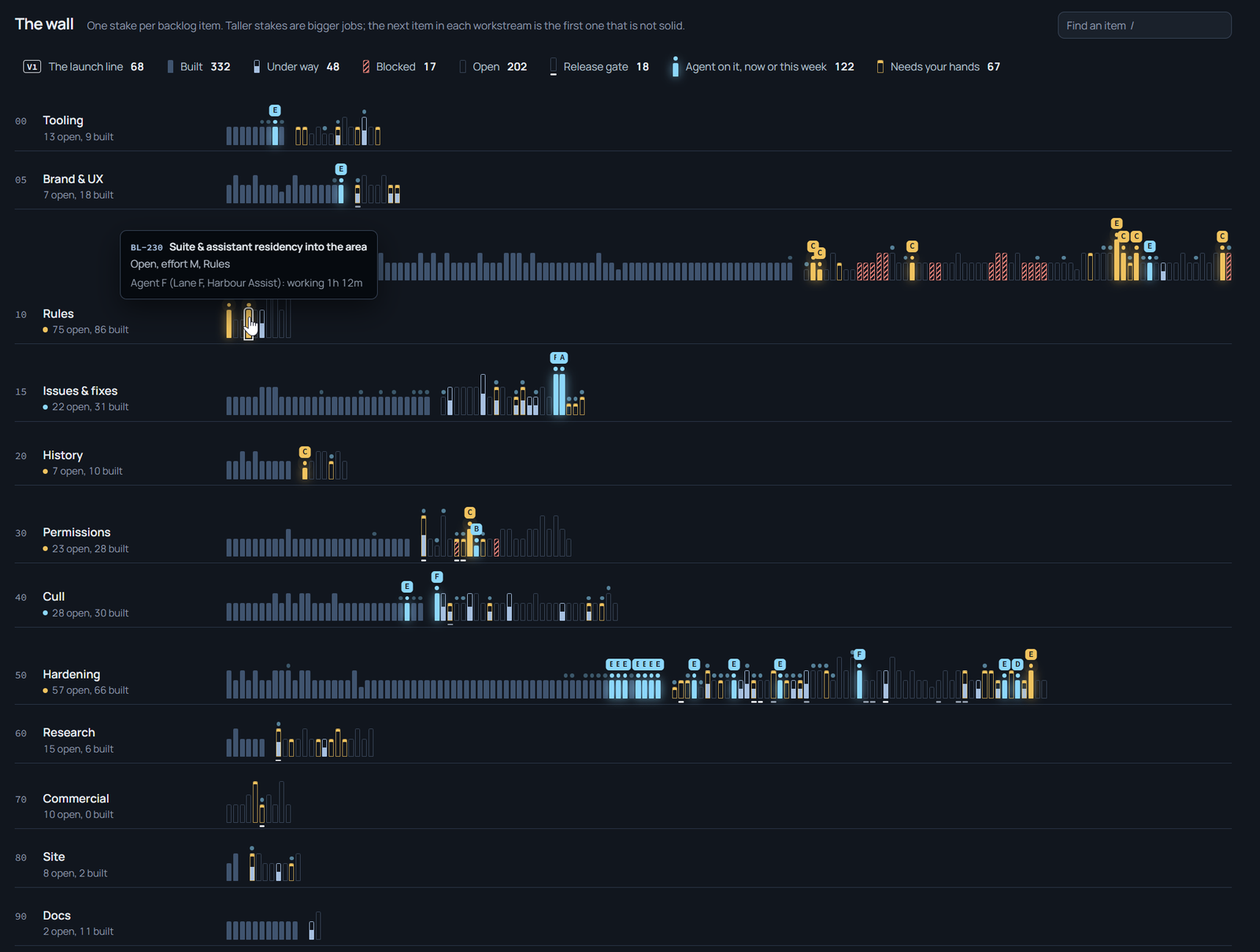 The wall: one row per workstream, one stake per item. The tooltip says which agent holds the stake and what it is doing.
Because the same workflow runs in all of my repositories, a second page folds every board on the machine into one view, so one glance covers all of them. This gives me a solid overview of the current state and progress, and any blockers, for all the projects in flight.
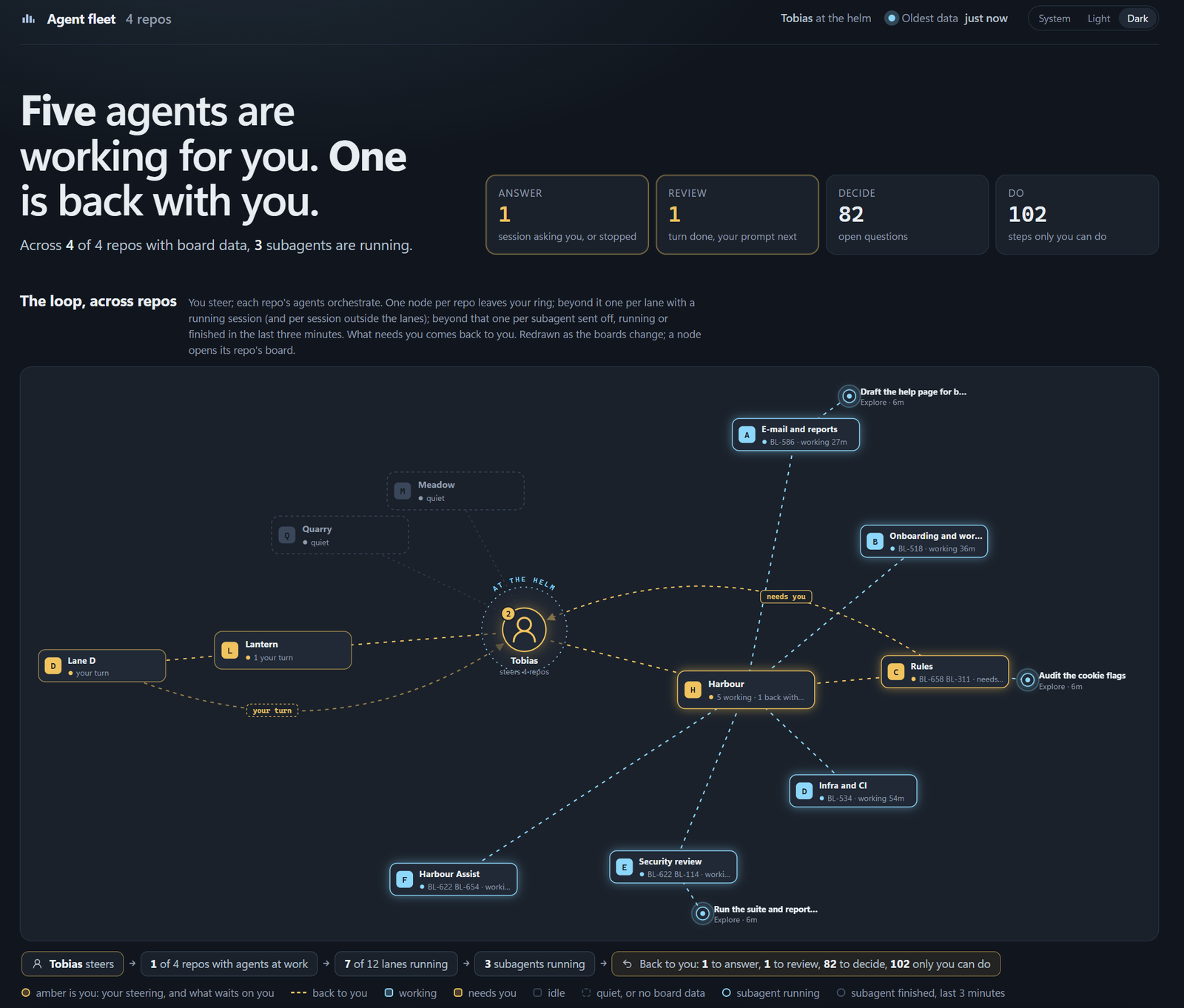 The fleet: every repository on the machine on one ring, and the counts across all of them on top.
Lessons learned
- Visualize things. The thing that worked best for me was making the “Waiting on me” a visible, counted thing instead of a feeling. Before I had this board, I was reading terminals or individual sessions in Claude Code or GitHub Copilot to see it asked a question 20 minutes ago and was now idle and waiting. Now, the amber badge tells me right away that I’m needed, and the agents stop less and make more progress.
- Decisive lanes. I designed a workflow where the “Lanes” (A, B, C, D, E, and F) are all responsible for separate sections of the source code. One for infrastructure, one for security reviews, one for building UI, one for building APIs and MCP servers, and so on. It was a bit of an experiment to get this rolling, but once I had figured out the clean-cut between coding lanes, this changed everything for the better; they can all run in parallel without causing conflict, and once they need to talk to one another or overlap, they communicate with each other. More on that in Part 4 of this series.
- More sessions doesn’t mean faster delivery. One thing that didn’t work is adding more sessions to solve the same problems faster. Past a certain point, the bottleneck is my own queue of answers piling up for review, and more agents only make that list longer sooner; the right number of lanes is the number of questions I could answer well, which is of course smaller than I’d like it to be. But, finding that balance was a real sweet spot because now I can confidently build and innovate more efficiently while retaining control of the workflow, decisions, and reviews.
- An agent’s green is not my green. A coding session reporting a passing test or security suite is reporting its own state, and if you use the same agents and models to define the tests and validating the outcome of those tests, you’re not really testing it at all. You’re just shipping green tests. Instead, I’m mobilizing models and workflows at this point to have other agents and models come in to verify, run tests, and assume the role of a critical engineering reviewer throughout the code base, not just ensuring the tests run green, but that they actually test the right thing, and what matters most.
Summary
If I can leave you with a single recommendation: if you are going to try this, start with one lane and a written list of what comes back to you, before you start a second session. Make the hand-back explicit: four kinds, counted, somewhere you look anyway. And keep the list of what stays with you short and in a file, because it is the thing that drifts first.
Next in the series: Part 2, What the humans do, what the agents do, and where the hard lines are.
If you run agents this way, or tried and stopped, what does your “waiting on me” list look like? Or, are you working differently? Find me on LinkedIn and drop me a comment. I’d love to hear more about how you work!
Comments are closed