I’ve been getting a couple of requests to provide details on how you can upload a file or document using the SharePoint Object Model, instead of using the UI.
With this simple article, I’m walking you through the process of uploading any file to your Document Library.
Note; Since this is done through the local API, you need to have this code running on the server. That means that it’s ideal to use in for example a FeatureReceiver or EventReceiver. You cannot run this code on the client in e.g. a Windows Form, then you’ll need to utilize the SharePoint WebServices instead.
Code: Upload a file to a SharePoint document library
Use the following code to get you started in uploading a file using the object model.
// Getting a reference to the document library
var sp = new SPSite("http://localhost");
var site = sp.OpenWeb();
var folder = site.GetFolder("Documents");
var files = folder.Files;

// Opening a filestream
var fStream = File.OpenRead("C:MyDocument.docx");
var contents = new byte[fStream.Length];
fStream.Read(contents, 0, (int)fStream.Length);
fStream.Close();

// Adding any metadata needed
var documentMetadata = new Hashtable {{"Comments", "Hello World"}};

// Adding the file to the SPFileCollection
var currentFile = files.Add("Documents/MyDocument.docx", contents, documentMetadata, true);

site.Dispose();
sp.Dispose();
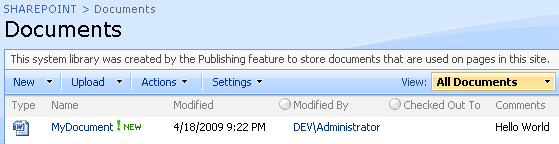
As you can see in the image below, the metadata “Comments” has been filled in as per the metadata specified in the code above.
Thanks for tuning in.


Comments are closed
Archived comments
Perfect example - just what I was looking for.
Cheers!
Yes, but let you know that it works only with : "datetime", "string", "int", or "bool" field-value types.
Other (complex) field-value types such as "lookup", "taxonomy", etc. are not seemingly supported by the method Add() you used.
Reeves
Hi, it is working on only local PC
Hi Melih,
If you want to do these types of things remotely, you should utilize the SharePoint 2010 Client Object Model. More about this and how to upload files using the Client Object Model can be found here: http://zimmergren.net/techn...
Cheers,
Tobias.
Great stuff, thanks Tobias!
Thanks for the comment, I appreciate it.
Cheers,
Tobias.
Hey Tobias ,
Thanks for the article , just wanted to know how to create and folder first and then insert the file set document into my doc library using C#
Hi Ajit,
Thank you for reading. So I just did a quick google search and came up with this:
http://www.c-sharpcorner.co...
It explains how you can create a folder in your document library...
Cheers,
Tob.
Will this work for SharePoint Online also. I mean in Office365. I am getting error
Hi Karthik,
Sure, for anything in SharePoint Online (O365 Sites) you can easily use the available CSOM to upload documents or perform a variety of other actions. The code here might need to be updated slightly since it's a pretty old post which referred to v14 of SharePoint - Office 365 is currently on v16 of SharePoint assemblies so there may have been some changes.
Of course, authentication et al with Office 365 is pretty straight forward today with CSOM too, so you should first make sure the requests are authenticated and then the rest should just fall in place - visit the MSDN docs over the CSOM API's and you're good to go mate.
The new Office 365 REST API's are pretty sweet too and worth checking out.
Regards,
Tobias.
thanks for the article.great job.
cheers.
Thank you Sanjaya. Glad you liked it.
Hiya!
I have a requirement of uploading themes and logo from a folder on a drive (user input: folder location, credentials, etc.) onto SiteAssets library and then change the theme of the SharePoint online site. I have created a console application (CSOM) which takes care of the upload part; what I can't get to do is, change the theme and logo of the site.
Any help would be appreciated.
is this blog still monitored? If so, how can we upload documents that are in subfolders and make the folder name metadata for the document? Example:
sales- (folder name)
- summary (folder name)
summary.doc
we want the metadata for the summary.doc document to be sales and Summary
Hey John,
Sure it is - however this article is from 2009 so I guess there's probably a few better tips and tricks along google. Otherwise www.mssharepointforums.com normally have some great people covering questions like this (Sorry, don't have my machines booted up right now so I can't hack something together).
Tobias.