Agentic AI engineering is an article series on running coding agents on real codebases: what I do, what the agents do, what worked and what didn’t. I wrote this for engineering leaders deciding whether to work this way, and the engineers who would. At the same time, I’m hoping you’ll have some ideas to share back so we can all learn together.
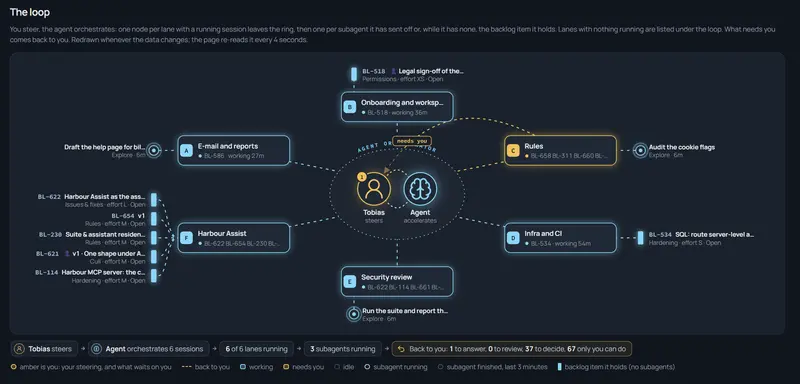
- Agentic AI engineering: I steer, the agents orchestrate
- Agentic AI engineering: What the humans do, what the agents do, and where the hard lines are (this post)
- Agentic AI engineering: Why instructions aren’t enough for coding agents
- Agentic AI engineering: Orchestrating coding agents across lanes without conflict
- Agentic AI engineering: Read-only by default, the MCP servers my coding agents may use and the ones they may not
- Agentic AI engineering: Lessons learned running coding agents, what broke, what failed, and what changed
Overview
When speaking with people about agentic AI engineering, everyone has their own flavor. For me, it typically boils down to a conversation around who does what. What do I do, what does the agents do, and how does this actually work? So, the list for me stays shorter, and the agents do most of the grunt work. I do the parts that need judgment, context the code does not hold, or a hand on something live. And a few things are hard lines: actions an agent never performs on its own, whatever it thinks the situation calls for. I wanted to highlight this split, conceptually, and the four ways work comes back to me, and the lines.
Context
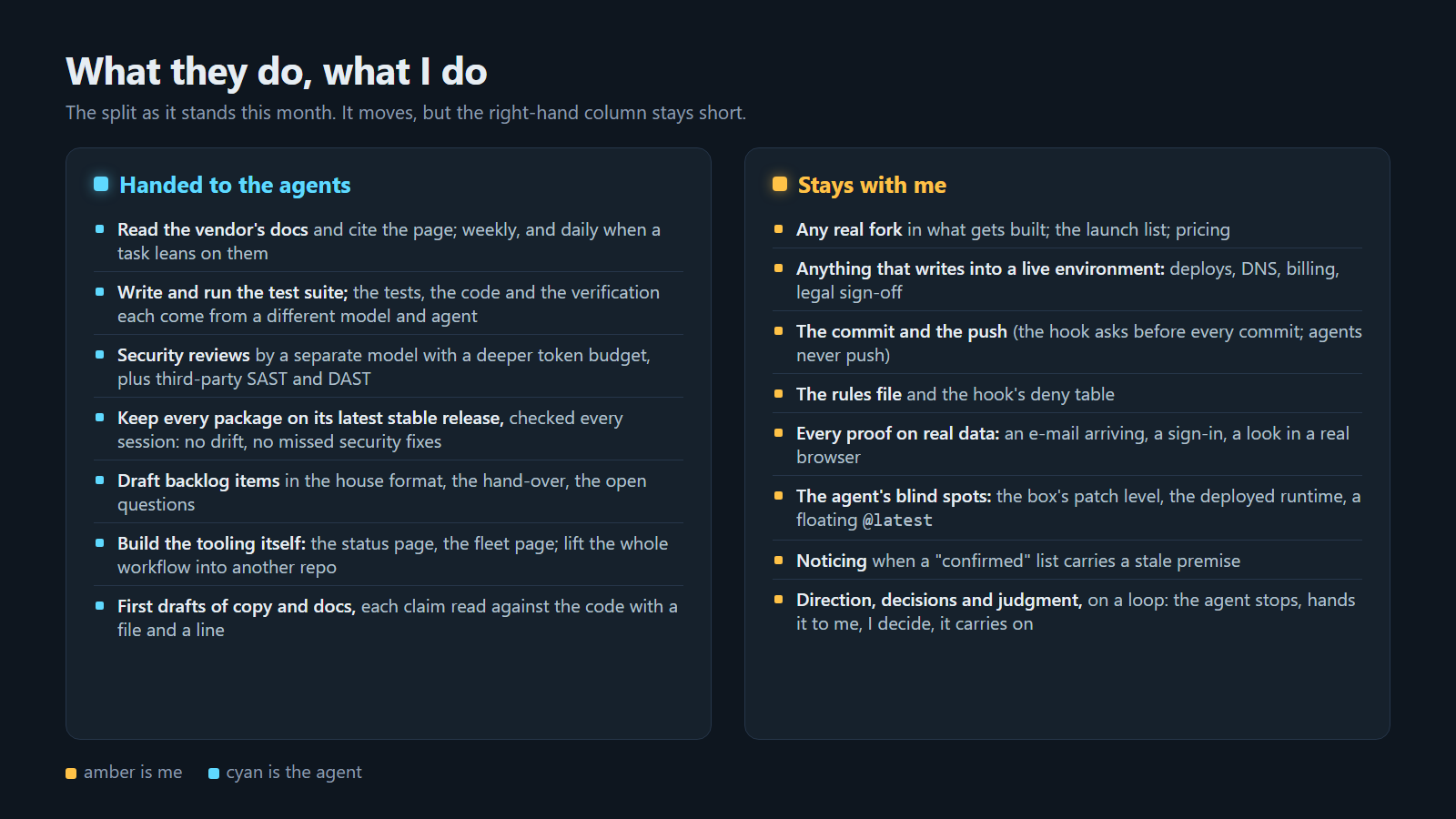 The split as it stands this month. The left column keeps growing; the right one stays short on purpose.
The left column is what I hand to the agents, and it has grown every month:
- Read the vendor’s documentation and cite the page. Weekly as a routine, and daily when a task leans on a specific page.
- Write and run the test suite. The tests, the code and the verification each come from a different model and agent, so the same engineering unit never builds and checks the same code.
- Security reviews by a separate model with a deeper token budget for holistic review and code analysis, plus third-party SAST and DAST tooling. They come back as a checklist.
- Keep every package on its latest stable release, checked every session. No dependency drift, no missed security updates.
- Draft the backlog items, the handover and the open questions, in the house format.
- Build the tooling itself, including the status page from part 1 and the fleet page.
- First drafts of docs and copy, each claim read against the code with a file and a line.
The right column is mine, and it is the same length it was months ago:
- Any real fork in what gets built, the launch list, pricing.
- Anything that writes into a live environment: deploys, DNS, billing, legal sign-off.
- The commit and the push. The hook asks before every commit, and agents never push.
- The rules file and the hook’s deny table.
- Every proof on real data: a mail arriving, a sign-in, a look in a real browser.
- The agents’ blind spots: the box’s patch level, the deployed runtime, a floating latest tag.
- Noticing when a “confirmed” list carries a stale premise.
- Direction, decisions and judgment, on a loop: the agent stops, hands it to me, I decide, and it carries on.
Ideation sits there too. Agents are very good at the next step and poor at knowing which step is worth taking.
How it works
The principle is that every hand-back has to be explicit, in a format both sides read, or it quietly turns into “the agent decided”. Nobody wants that, and I lived through that a few times before I could adjust and fine-tune the processes across the repos. Three plain files carry most of this, which we’ll dive into now.
The backlog is the agent’s map
This can work in various ways. Using Azure DevOps work items, work items inside your repo as markdown files, or any other system you’re using. I flipped a few of my experimental projects to using per-repo markdown files holding the actionable work ahead and decisions, with an Azure DevOps MCP server that can sync back to an Azure DevOps team project if necessary.
For now, it’s one markdown file per workstream (project), open items only, one line per item, and priority is the order in the file: the top item is next in line. Done items move to a single “done-file” with a date, so the open files stay short enough to read every morning without burning more tokens. A fixed launch list exists that only I add to. Four items look like this (scrubbed for this article), one in each state the board knows: in progress, blocked, open, and waiting on me:
- [ ] ⏳ **BL-598** Generate the monthly report in the background · `M` · src: BL-564 ·
      decided: keep the last three reports per workspace, not all (my call, recorded here, not a question) ·
      done = a large workspace gets its report without a timeout and one test covers each outcome
- [ ] 🚫 **BL-612** Send the report by mail when it is ready · `S` · src: BL-564 ·
      blocked by BL-598: the mail links to the stored file ·
      done = the mail test passes and the link opens the file
- [ ] **BL-623** The reports page shows who requested each report · `XS` · src: BL-564 ·
      done = the column renders for a workspace with two reports and for one with none
- [ ] 👤 **BL-619** Confirm the sender address in the mail admin center · `S` ·
      the agent cannot: it needs a portal sign-in · steps: open the admin center, verify the
      domain, add the sender · pass line: a test mail arrives within a minute
The note on an item says what someone needs in order to start: the blocker, the governing decision, what done means. What already shipped, test counts and session narration stay out; they belong in the commit message.
The four lines above are short so the format is visible. In practice the note is the whole brief, and it runs to a paragraph: what is wrong, what the fix is, the decision that governs it, what it blocks, and a done line with every outcome named. Sub-bullets underneath hold what is still open, the constraints, and the steps for me. Anything deeper, a design note or a test plan, is a document the item points to rather than repeats. Here is one item at its real size, with the names and the work replaced:
- [ ] ⏳ **BL-598** Generate the monthly report in the background · `M` · src: BL-564 and
      the design note on reports (docs/design/reports.md) · today the report renders on the
      request thread, so a workspace with a year of activity hits the request timeout and
      gets nothing; the fix is a queued job that writes the PDF to storage, a reports page
      that shows queued, ready or failed, and a download link that reads the stored file ·
      decided: keep the last three reports per workspace, not all (my call, recorded here,
      not a question for the decisions file) · blocks BL-612, which mails the link to the
      stored file · done = the large test workspace gets its report without a timeout, the
      page has one test per state (queued, ready, failed, expired), and the on-request path
      is deleted, not kept behind a flag
  - **Lane C, in progress:** the job and the storage write are in; the page shows queued
    and ready; failed is not handled yet; the old path stays until the new tests pass
  - **Constraint:** the storage container is declared in the deploy template before the job
    runs on dev, or the first run fails on a missing container; the order is in the handover
  - 👤 **For me, when the lane says ready:** open the reports page for the large test
    workspace in a real browser, request the report, wait · pass line: the download opens a
    PDF with the workspace name on page one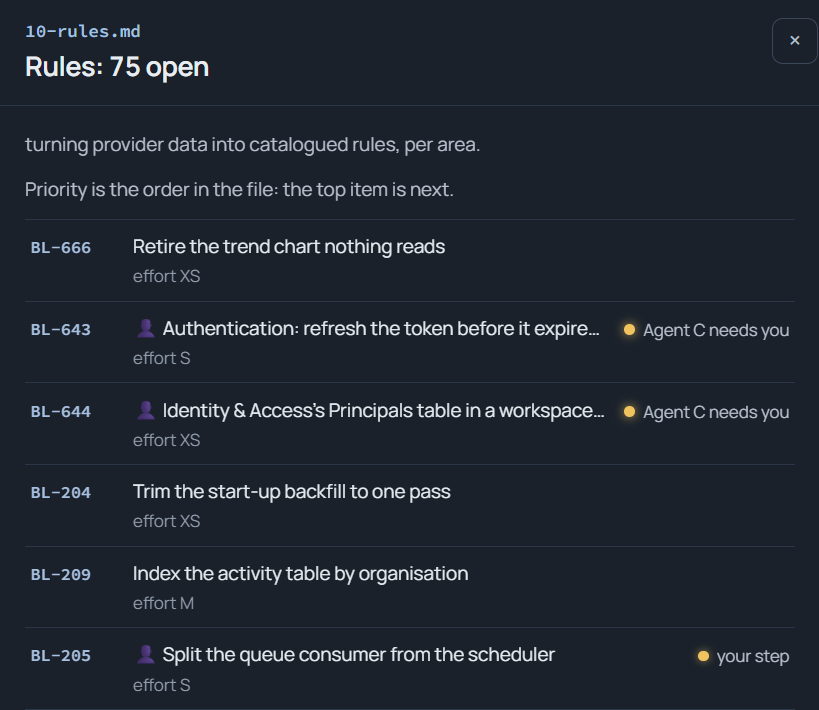
The backlog has passed six hundred and fifty numbers, and that is not drift: an evening project that gets analyzed in parallel for reliability, security, operational excellence and performance produces a long list quickly, because it is the whole picture broken into chunks an agent can finish in a session.
Four ways work comes back
Answer, Review, Decide and Do, the four counts on the board. Two of them have their own mechanics.
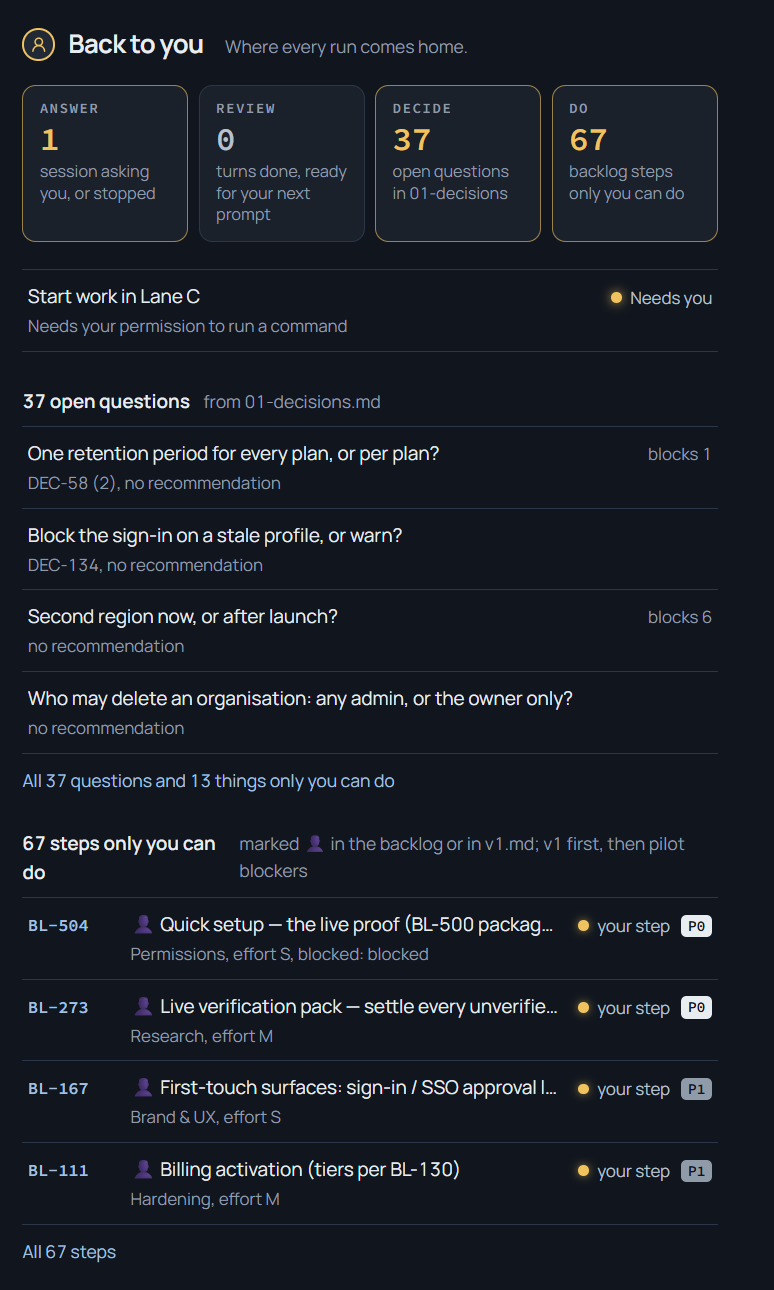
Decide has a file of its own: open questions for me only, a few lines each, with the agent’s recommendation. The rule in the rules file is that an agent never settles a real fork silently; a call it can make itself is recorded on the item or in the commit, not as a question to me. When I answer, the answer goes onto the affected items and the entry is deleted, so the file is always exactly the set of open forks.
Do is the person icon on an item. Every such item carries the steps, the names, the command and the pass line, inline, so I can tick it in a few minutes without re-deriving what the agent meant. If an item with the icon makes me think, the item was not ready.
The hard lines
A short list of acts, and they are acts, not topics. An agent does not commit when I have not asked (the hook asks on every commit, see part 3). It never pushes. It never deploys or touches anything live: DNS, billing, mail, the production configuration. It never deletes recursively. It never edits the rules file or the hook’s deny table; an amendment is a proposal in the decisions file. It never settles a fork. And it never mints a backlog number outside the block its lane claimed. How those are enforced rather than requested is part 3.
Lessons learned
- Writing the pass line into the item worked better than anything else I tried. “Done when the test passes” is something the agent and I read the same way; “make it robust” is not. (Remember the folks prompting “make no mistakes”? Yeah, that obviously doesn’t work :) )
- The decisions file’s strict door worked: if a question is in the file, it is a real fork; and anything not in the file the agent decides and records. The earlier version, “ask me if unsure”, produced either too many questions or none, depending on the session’s mood, and I saw a lot of variance in the outcomes here.
- What did not work was trusting a list because it said confirmed. An agent handed me a confirmed list of pending items, and one entry rested on a premise an earlier, closed item had already changed. The fix was a habit rather than a tool: every confirmed entry gets checked against the done file before I act on it, hence, the agents can verify each others and their own work before it reaches me.
Summary
If I can leave a few recommendations for this part of the article series, it’s to:
- Write the human’s list down and keep it short.
- Give every hand-back a pass line.
- Keep one file for open forks and delete entries as you answer them.
- If an agent has to ask what done means, the item was not ready for an agent. Figure out why, fix, and circle back.
I’m happy to spar ideas on this topic or listen in on how you’re working with agentic AI-driven engineering. Don’t hesitate to reach out! I’m on LinkedIn.
Comments are closed