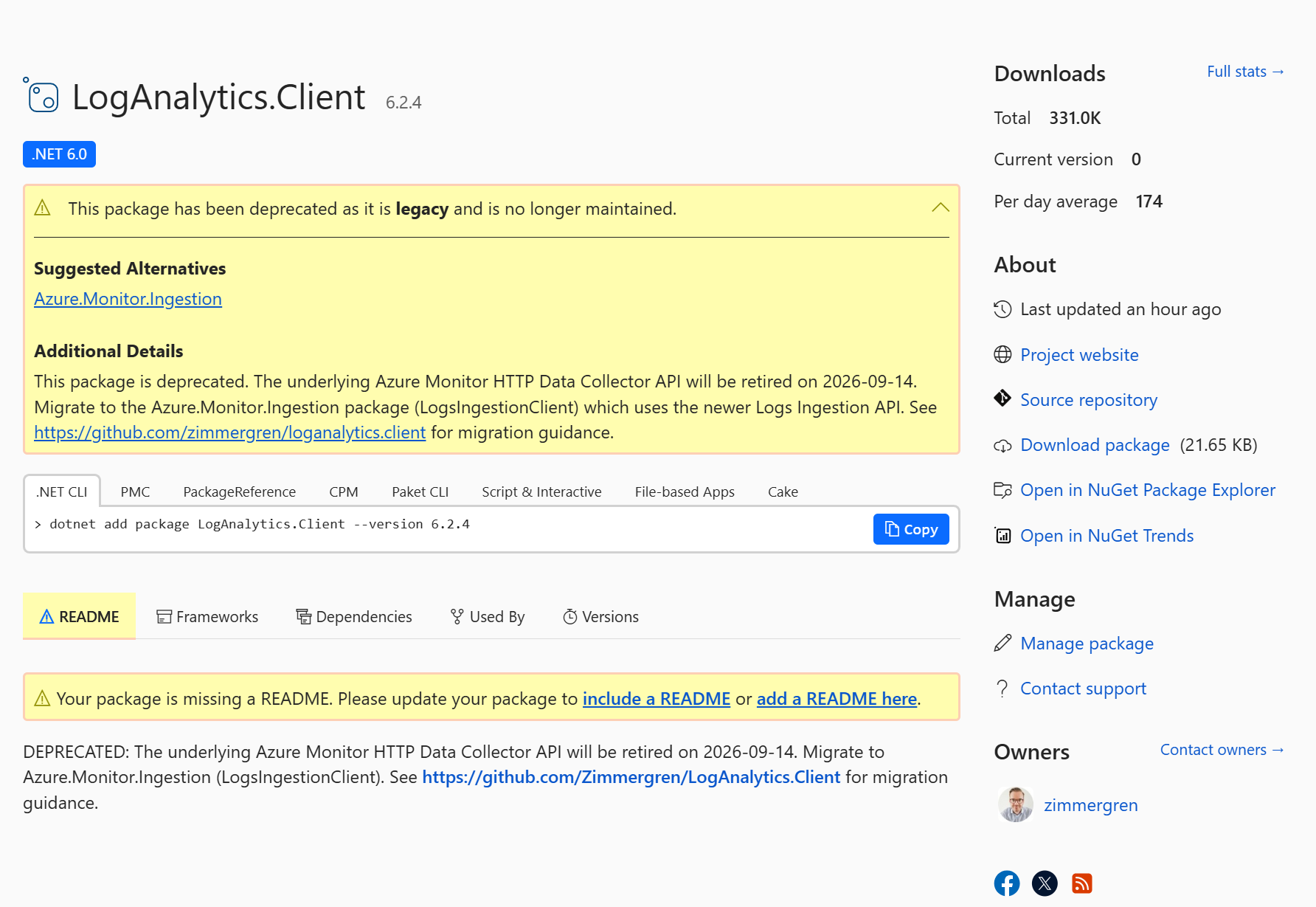
Today I archived and deprecated LogAnalytics.Client, my open-source .NET library for sending custom log data to Azure Log Analytics. The package has been downloaded over 330,000 times on NuGet and adopted in production by organizations worldwide, from startups to some of the largest enterprises on the planet. With Microsoft retiring the underlying API, it’s time to move on.
Background
Back in 2018, sending custom data into Azure Log Analytics from .NET required manually crafting HTTP requests, computing HMAC-SHA256 signatures, and assembling the right headers for the HTTP Data Collector API. There was no official SDK to make this simple.
I built LogAnalytics.Client to solve exactly that. A lightweight wrapper that let you construct a plain C# object and send it to Log Analytics in a couple of lines of code:
var logger = new LogAnalyticsClient(workspaceId, sharedKey);
await logger.SendLogEntry(new MyEntity { Message = "Hello" }, "MyCustomLog");
It also supported batch ingestion, sovereign clouds, and .NET Core 3.x through .NET 6. What started as a simple utility grew into a production-grade library with widespread adoption across industries, used by startups, enterprises, and everything in between. Over time it gathered 49 stars and 15 forks on GitHub, and surpassed 330,000 NuGet downloads 😍
I wrote about the journey in a few earlier posts:
- Building custom Data Collectors for Azure Log Analytics
- Introducing the LogAnalytics.Client NuGet for .NET Core
- Log custom application security events in Azure Log Analytics which are ingested and used in Microsoft Sentinel
What’s happening
Microsoft has deprecated the HTTP Data Collector API that LogAnalytics.Client wraps. The API will be retired on September 14, 2026, after which it will stop functioning entirely.
Because the library is fundamentally tied to that API, there’s no path forward for it. Version 6.2.4 is the final release. The GitHub repository is now archived and read-only, and the NuGet package is marked as deprecated.
The official replacement
Microsoft’s replacement is the Logs Ingestion API, backed by an official .NET SDK: Azure.Monitor.Ingestion.
Key differences from the old approach:
| LogAnalytics.Client (old) | Azure.Monitor.Ingestion (new) | |
|---|---|---|
| Auth | Workspace Shared Key (HMAC) | Microsoft Entra ID (OAuth2 / DefaultAzureCredential) |
| Endpoint | {workspaceId}.ods.opinsights.azure.com | Data Collection Endpoint (DCE) |
| Config | Workspace ID + Shared Key | DCR ID + Stream Name + Endpoint URI |
| Table targeting | Log-Type header | DCR stream declarations |
The new approach is more secure (no shared keys), more flexible (Data Collection Rules let you transform and route data), and fully supported.
How to migrate
1. Set up Azure-side resources
Before changing code, you need:
- A custom table (or a supported Azure table) in your Log Analytics workspace.
- A Data Collection Rule (DCR) that maps incoming data to the target table.
- An app registration in Microsoft Entra ID (or a managed identity) with the Monitoring Metrics Publisher role on the DCR.
Microsoft provides a full walkthrough: Tutorial: Send data to Azure Monitor Logs with Logs ingestion API.
2. Install the new packages
dotnet add package Azure.Monitor.Ingestion
dotnet add package Azure.Identity
3. Update your code
Before (LogAnalytics.Client):
using LogAnalytics.Client;

var logger = new LogAnalyticsClient(
    workspaceId: "your-workspace-id",
    sharedKey: "your-shared-key");

await logger.SendLogEntry(new MyEntity
{
    Message = "Hello",
    Severity = "Info"
}, "MyCustomLog");
After (Azure.Monitor.Ingestion):
using Azure.Identity;
using Azure.Monitor.Ingestion;

var endpoint = new Uri("https://<your-dce>.ingest.monitor.azure.com");
var client = new LogsIngestionClient(endpoint, new DefaultAzureCredential());

var entries = new[]
{
    new { TimeGenerated = DateTime.UtcNow, Message = "Hello", Severity = "Info" }
};

await client.UploadAsync(
    ruleId: "<dcr-immutable-id>",
    streamName: "Custom-MyCustomLog",
    entries);
Further reading
- Logs Ingestion API overview
- Azure.Monitor.Ingestion SDK reference
- Tutorial: Send data using Logs ingestion API
Thank you
To every team and organization that relied on LogAnalytics.Client in production, whether you integrated it into a startup MVP or rolled it out across enterprise-scale infrastructure: thank you. Seeing a project I built reach 330,000+ downloads and real-world adoption at that scale is something I’m genuinely proud of. I hope the migration to the official SDK goes smoothly for you.
Comments are closed