Author: Tobias Zimmergren
http://www.zimmergren.net | http://www.tozit.com | @zimmergren
Introduction
As most if not all of you already know, SharePoint 2013 and Office 2013 has been released to preview/beta and is available for download from Microsoft’s download centers. In this article I will briefly introduce some exciting changes that has been made to the SharePoint 2013 Business Connectivity Services framework. I’ve written a bunch of articles on BCS for SharePoint 2010, and now it’s time to continue that track and introduce the new features available in SharePoint 2013.
[blockquote]
Please note that this article is written for SharePoint 2013 Preview, and for the final version of SharePoint some details may have changed
- SharePoint 2013: Business Connectivity Services – Introduction
- SharePoint 2013: Business Connectivity Services – Consuming OData in BCS Using an App External Content Type
- SharePoint 2013: Business Connectivity Services – Talking to your external lists using REST
- SharePoint 2013: Business Connectivity Services – Client Object Model
- SharePoint 2013: Business Connectivity Services – Events and Alerts
[/blockquote]
SharePoint 2013 – BCS with OData
In this specific article we’ll be looking on how you can consume data from an Open Data protocol (OData) data source. Tag along for the ride!
First of all, tell me what OData is…!?
Right, so OData is a Web protocol for performing CRUD (Create Read Update and Delete) operations and utilizes technologies like HTTP, ATOM and JSON.
As quoted from the OData Web Site:
[blockquote]
The Open Data Protocol (OData) is a Web protocol for querying and updating data that provides a way to unlock your data and free it from silos that exist in applications today.
OData does this by applying and building upon Web technologies such as HTTP, Atom Publishing Protocol (AtomPub) and JSON to provide access to information from a variety of applications, services, and stores.
[/blockquote]
We can have lengthy discussions about how awesome (or unawesome) OData is but in this article we’ll be focusing on consuming OData data sources in SharePoint 2013 through Business Connectivity Services, one of my favorite parts of SharePoint.
Launch Visual Studio and get started!
So, as you probably could tell by the title of this post – you should now open Visual Studio 2012 :-)
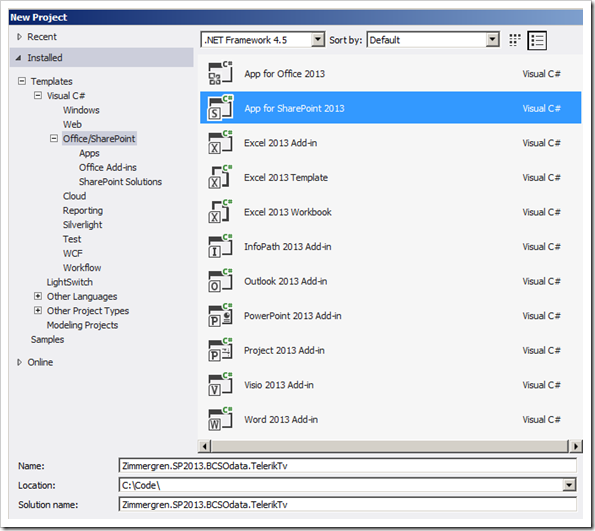
Create the project
Choose the project type App for SharePoint 2013:
[ et/content/images/2012/08/image11.png)
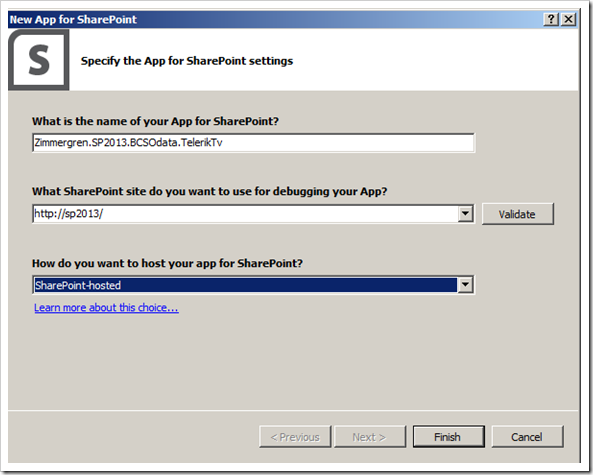
The Wizard that launches will give you a few choices which we’ll discuss in another article. In this article I’ve selected the “SharePoint Hosted” alternative, as you can see below:
[ et/content/images/2012/08/image12.png)
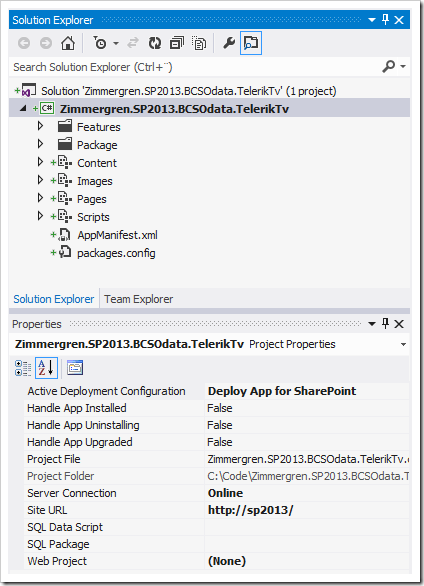
This should get you setup with the initial project structure, and you should now have a project that looks something like this:
[ et/content/images/2012/08/image2.png)
Add an external content type
Now that we’ve created our initial project, we should add a new external content type. If you right-click your project and choose Add, you can see that there’s a new menu item called “Content Types for an External Data Source…“. Click it:
[ et/content/images/2012/08/image91.png)
In the following wizard, you can enter the service URL for the OData provider you’d like to consume. In my example I’ve used the public tv.telerik.com/services/odata.svc OData service:
[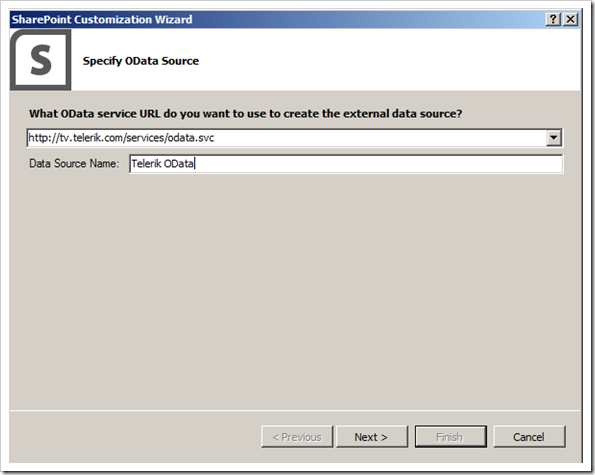 et/content/images/2012/08/image13.png)
In the next step in the wizard, you get to select for which data entities you want to generate external content types. Choose the entities you’d like to work with and continue by pressing Finish:
Please note that you should leave the “Create list instances for the selected data entries (except Service Operations).” checked so the tools can create your external list automatically!
[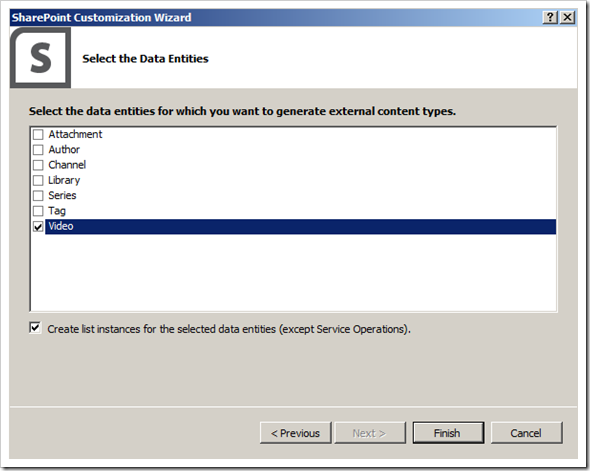 et/content/images/2012/08/image14.png)
After we’ve completed this step, we can see a few additions in our project that Visual Studio 2012 has been so kind to help us out with.
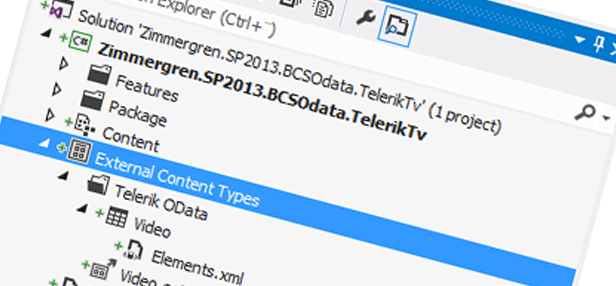
A Telerik Video external content type with it’s associated ListInstances (one per entity, in my case only one for Video) that it was also kind enough to create for us since I had the checkbox in the previous dialog ticked:
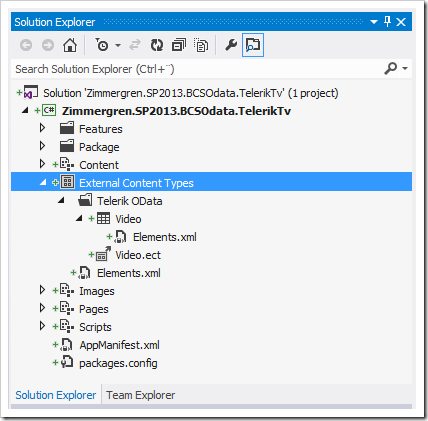
Looking in your Feature explorer, you can see that the default Feature now contains your artifacts along with the newly created List Instance and External Content Type:
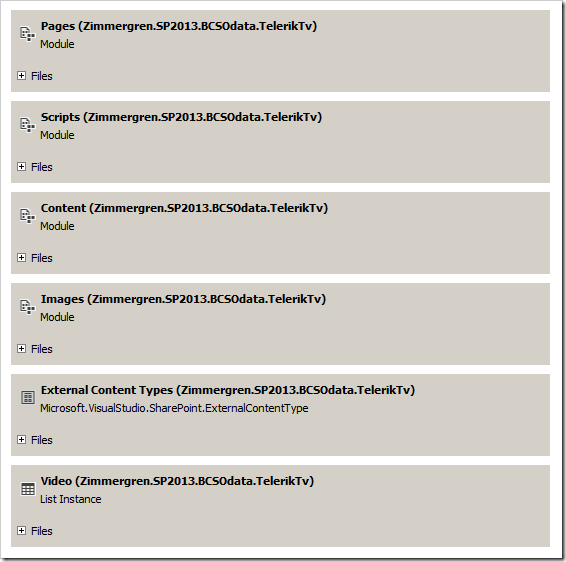
In the newly created List Instances, the following XML has been generated for us:
As you can see, the ListInstance DataSource node contains information about connecting to our newly created BCS entity. Perfect.
Just to make sure that we can deploy our solution, hit F5 and make sure that VS2012 deploys your project properly
Validate that your application works
Navigate to your site and validate that your new App is properly deployed and showing:
[![SharePoint 2013 app]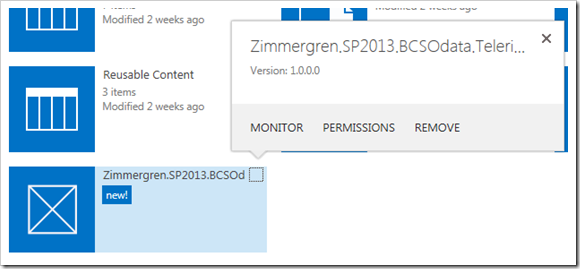 et/content/images/2012/08/image15.png)
Click the app and make sure you can see the result of your very basic and “hello world”-ish app:
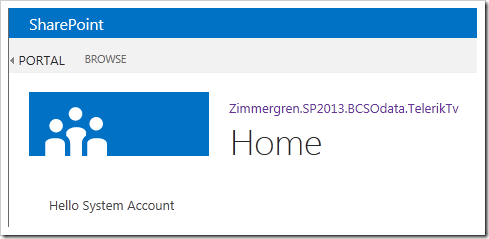
Display your new external list!
Do you remember in one of the previous steps that I mentioned that you should leave the checkbox ticked in a dialog, saying “Create list instances for the selected data entries (except Service Operations).”? Well the reason for that is that we want Visual Studio 2012 tools to create this list for us so we don’t have to do that ourselves.
With the newly deployed BCS external content type app, with it’s created list, you can access the content of the list on the following URL (you’ll need to check your Elements.xml for your ListInstance element in order to find out your url:
Navigate to this URL and you’ll see this view:
[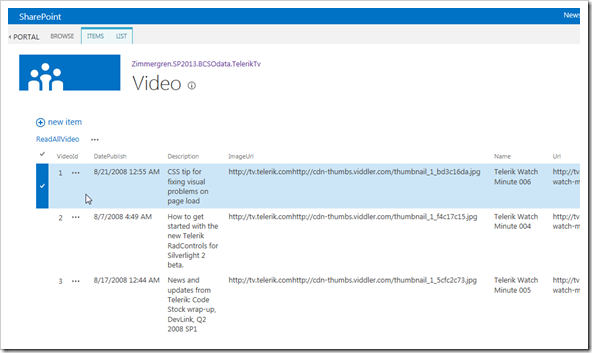 et/content/images/2012/08/image16.png)
So that’s pretty cool and easy right? Straight from the XML-formatted OData source we’ve pulled some info into our App in SharePoint.
Summary
As you can see, working with SharePoint 2013 and the OData model with BCS is pretty straight forward. In this example I created an App for SharePoint utilizing the BCS framework to connect to an OData data source. I’m pretty impressed with the options this opens up for many of our existing SharePoint 2010 projects that sometime in the future will be upgraded to SharePoint 2013.
In the next few posts we’ll dive more into the news around BCS for SharePoint 2013.
Enjoy.
Comments are closed
Archived comments
i like to learn more on what is apps and how are they used in sharepoint. can we use apps in sharepoint 2010 also and can we use this odata also...?
Hi SharePointStein,
Apps are a new kind of technique introduced in SharePoint 2013 and doesn't exist in SharePoint 2010. OData can be utilized in many different ways and doesn't have to be consumed using BCS or an App, but in this sample we looked at how we could simplify the retreival of that data using BCS in SharePoint 2013.
If you want more info on OData, follow the link in the article to find box examples and live services running OData and examples of how to create your own OData providers.
Hi Tobias, to avoid confusion, we should say "apps for SharePoint 2013" (there will be for Office 2013 too!).
I'm sure your preparing an article about it, MSDN has a great overview:
http://msdn.microsoft.com/e...
Hi Tran,
Thank you for your comment. Yes that's true, there's Apps for Office and Apps for SharePoint. These are different types of apps for different products.
Documentation says "also supported in SharePoint Designer", where???
Hi Half Scheidl,
Where did you find that reference?
Cheers,
Tobias.
Hi Tobias,
First at all, thanks for examples.
I need help in this scenario. It works fine, but when i try to launch with my own odata http://mysite/_vti_bin/listdata.svc and navigate to app-{guidapp}.mydevsite:3000/myfirstapp/Lists/MyList/ReadAllMyListItem.aspx returns issue "LobSystem (External System) returned authentication error" and logs does not return consistent results.
Any ideas?
Regards,
Thanks for the great post. How do i make this a Readonly list.
Hi Tobias,
Thank you for your article, Well articulated and very useful...
I have a question here: Does BCS have some intelligent means to handle OData providers from large data source having millions of records?
In BCS WCF Connectors, we normally use to bring in a PageNumber filter into our BDC model and add an additional pagenumber parameter to our WCF service to handle paginations and large data source. BCS then increments PageNumber values from 0,1,2 etc. until it queries all the data from external system. But i didn't quite find any documentation on pagination for OData connectors and how it works when data source is bringing in millions of records.
Have you tried large data sources with the BCS OData connector?
Hi Tobias,
Good article! Thanks for the example it works fine!.
Now, I'm searching for an example like this, but for Sharepoint 2013 online with BCS consuming Odata with Windows Authentication security. I configured Secure Store Service, BCS connection, security, etc., the app deploys but can't connect to server.
The Odata service is working.
I can't find out what i'm doing wrong.
Have you faced a scenario like this?
Thanks!
Norberto
Hi Norberto,
Thank you for the comment.
While I haven't had the exact scenario you describe, I guess a bit of debugging would help. But I would post the question to www.mssharepointforums.com in order to get more people's attention to this specific issue :-)
Cheers,
Tob.
Can I create an external content type without creating an App?
wonderful; straight and direct. thanks for sharing the knowledge
Hi Kenny,
Thank you for the comment, I'm glad you liked it :-)
Cheers,
Tobias.
Hi Tobias, Thanks for such a great article. I just tried the steps in your blog and got the error "The remote server returned an error: (407) Proxy Authentication Required." the OData service that i am using is http://services.odata.org/V.... Can you help us in finding possible cause of this issue.
Thank you Tobias, this a very good presentation. I have a cloud environment but not sure I have any OData web service available. Is there any way to find it out?