Introduction
As most if not all of you already know, SharePoint 2013 and Office 2013 has been released to preview/beta and is available for download from Microsoft’s download centers. In this article I will briefly introduce some exciting changes that has been made to the SharePoint 2013 Business Connectivity Services framework. I’ve written a bunch of articles on BCS for SharePoint 2010, and now it’s time to continue that track and introduce the new features available in SharePoint 2013.
[blockquote]
Please note that this article is written for SharePoint 2013 Preview, and for the final version of SharePoint some details may have changed
- SharePoint 2013: Business Connectivity Services – Introduction
- SharePoint 2013: Business Connectivity Services – Consuming OData in BCS Using an App External Content Type
- SharePoint 2013: Business Connectivity Services – Talking to your external lists using REST
- SharePoint 2013: Business Connectivity Services – Client Object Model
- SharePoint 2013: Business Connectivity Services – Events and Alerts
[/blockquote]
SharePoint 2013 – BCS with REST
In this article we’ll be taking a further look on the new Business Connectivity Services changes and additions in SharePoint 2013. I want to take a quick look and introduce how REST (Representational State Transfer) can be used and also how the Client Object Model can be utilized to communicate with your External Lists and BCS Entities.
So without further delays, let’s dig into the fantastic world of BCS and CSA (Client Side Awesomeness).
[blockquote]Important: The project type in this project, as mentioned in the post where we started building our sample, is a SharePoint-hosted app.[/blockquote]
Business Connectivity Services and REST
Utilizing REST in BCS in your SharePoint 2013 environments isn’t really that big of a deal. It’s pretty straight forward. The first thing you should do is take a look at the following link which references the MSDN article about getting started with REST in SharePoint 2013.
[blockquote]MSDN Reference: http://tz.nu/QXfooY [/blockquote]
So now that we know that REST is all about, we’re going to look at some code that will utilize REST to retrieve some data. In this sample I’ll continue to build on the solution I created in the previous article.
Final result will look like this
When our first snippet of code will be done, it’ll look something like this where our (in this case) App (page) is loaded:
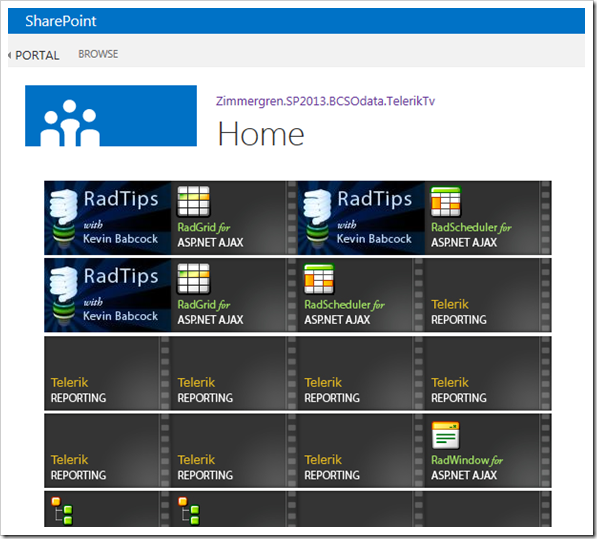
So what the code will do is to pull out the images and links for the videos in the Telerik.Tv OData data source that we created in the previous article, and we’ll be doing this using the REST API’s.
In one big snippet, here’s what the REST call looks like in my App.js:
var context; var web; var user; function sharePointReady() { var requestUri = *spPageContextInfo.webAbsoluteUrl + ”/*api/lists/getbytitle(‘Video’)/items”; jqxhr = $.getJSON(requestUri, null, onSuccessfullJSONCall); jqxhr.error(onErrorInJSONCall); } function onSuccessfullJSONCall(data) { var outputHtml = ""; var results = data.d.results; var counter = 0; for (var i = 0; i < results.length; i++) { outputHtml += “[image]”; counter++; if (counter >= 4) { outputHtml += "
"; counter = 0; } } $(“#message”).html(outputHtml); } function onErrorInJSONCall(err) { $(“#message”).text(“Unawesome Error: ” + JSON.stringify(err)); }
As you can see in the aforementioned code snippet, the calls to the REST API’s are pretty straight forward and I’m only making a quick call to fetch the data asynchronously using the $.getJSON() method.
Lets break it down in sections..
Script part 1: sharePointReady() method call
Since our project type (a SharePoint-hosted App) contains a stub for the Default.aspx page and the App.js files – a method called sharePointReady is defined in the App.js file and in the Default.aspx you have the following block which initiates the call to this method upon loading all other required awesome things:
(Optionally, you can put this code-block in the actual App.js file as well if you’d like – it’s up to you)
When SharePoint is done loading all the required stuff that it needs to function (sp.js), this method is executed. In this sample, I’m making a simple JSON call to the REST API using the syntax http://url/_api/lists/getbytitle(‘ListTitle’)/items which will get all list items in the list named Video:
function sharePointReady() { var requestUri = *spPageContextInfo.webAbsoluteUrl + ”/*api/lists/getbytitle(‘Video’)/items”; jqxhr = $.getJSON(requestUri, null, onSuccessfullJSONCall); jqxhr.error(onErrorInJSONCall); }
Script part 2: On successful JSON callback, the following block is executed
We’re executing the onSuccessfullJSONCall() when our previous call is successful, and it’ll basically just parse the JSON result and push the items out in a simple HTML structure:
function onSuccessfullJSONCall(data) { var outputHtml = ""; var results = data.d.results; var counter = 0; for (var i = 0; i < results.length; i++) { outputHtml += “[image]”; counter++; if (counter >= 4) { outputHtml += "
"; counter = 0; } } $(“#message”).html(outputHtml); }
Script part 3: In case of unawesomeness (failure)
In case the request failed, we’ll be handling that somehow in this method. In this case we’ll just be printing out the error message very quickly to the user:
function onErrorInJSONCall(err) { $(“#message”).text(“Unawesome Error: ” + JSON.stringify(err)); }
Summary
In this article we took a very quick look at how to get that first REST call working with SharePoint 2013 against our External List called “video”. With the returned result in JSON, we’re parsing it out and simply rendering the result in a more reader-friendly manner as pictures in a simple HTML grid.
So that’ll be it for the REST calls for now. It should get you started and set-up for creating a very simple application that utilizes REST for retrieving data from SharePoint.
More details on working with the REST API’s in SharePoint 2013 will follow later, including how to perform cross-domain queries.
Enjoy.


Comments are closed
Archived comments
Great use case, where the emphasis clearly is on the BCS. Nevertheless I'm a little bit confused by the JavaScript above. As the BCS list lives in the AppWeb there should be no need to use the cross-domain library to access the OData endpoint. You should be able to switch to a normal $.ajax call instead. The cross-domain library should be used in cases where you want to access information in the HostWeb from your app. In that case there's an additional step required, where you have to configure the app permissions. Here's a post that covers this scenario for a simple Napa app http://rainerat.spirit.de/2...
Thanks for the comment. Valid points indeed. The library can be used like this, however you are correct in what you are saying - I've mixed up two of my code snippets and therefore I've used the cross-domain script. I'll be fixing this up during the week and update the article with both use cases :-)
Cheers,
Tobias.
Cool, two use cases for the price of one ;-). Thanks,
Rainer
Monsieur, the code has been updated (and shortened) and is validated to work. I'll be sure to shoot up some stuff about the cross-domain scripts later as well - after I've posted the rest of the BCS stuff. Thanks again for the heads up on the mixup.
Cheers,
Tobias.
Can you please provide us the link for the CORS script. We are trying to do REST on external list that lives in Host web , from the sharepoint hosted app.
Hi Aviator,
Unfortunately I don't have this script handy anymore, I only used it as a sample for this blogpost but never saved the sample project.
Tobias.
Hi! I'm curious about how to call a BCS list if the list lives in the hostweb.
how to call a BCS list if the list lives in the hostweb. Please reply
I have tried to access the BCS list (created thorugh farm level external content type) residing in host web but not able to. Unauthorized error coming up. Please assist