Agentic AI engineering is an article series on running coding agents on real codebases: what I do, what the agents do, what worked and what didn’t. I wrote this for engineering leaders deciding whether to work this way, and the engineers who would. At the same time, I’m hoping you’ll have some ideas to share back so we can all learn together.
- Agentic AI engineering: I steer, the agents orchestrate
- Agentic AI engineering: What the humans do, what the agents do, and where the hard lines are
- Agentic AI engineering: Why instructions aren’t enough for coding agents (this post)
- Agentic AI engineering: Orchestrating coding agents across lanes without conflict
- Agentic AI engineering: Read-only by default, the MCP servers my coding agents may use and the ones they may not
- Agentic AI engineering: Lessons learned running coding agents, what broke, what failed, and what changed
Overview
A short primer on instructions vs. rules
Before diving in here, let’s settle two terms right away.
- The instructions file is just that, preferable instructions, for example
CLAUDE.md, that an agent reads at the start of a session. Everything in there is a preference. The agent reads it, understands it, and then decides on every single turn whether to follow it or not; and it decided not to do that more times than I can count. - The rules are the things the harness enforces, regardless of whether the agent agrees or not.
- For example, the permission settings in
.claude/settings.json, which deny a tool call or stop and ask me before it, and a hook script that reads every terminal command before it runs and can refuse it. An agent can’t talk its way around those the same way it can instructions.
- For example, the permission settings in
That raises the obvious question of why I keep rules in the instructions file at all, when the file can’t enforce them. The answer is that the two copies do different jobs.
- The hook can only say no, after the agent has already decided to run something.
- The instructions are where the agent learns what is allowed and why before it starts, so it plans its work inside the list instead of running into the hook over and over and burning turns on refusals.
So, when the hook refuses to run a command, its message points back to the section in CLAUDE.md, so the agent can read the reason and pick a different route. This is also where I’ve instructed the agents to write up a brief about what happened, what led to running into this, and what we can consider updating in the instructions to have agents become more efficient and avoid that path next time, even if it’s still a preference and not an enforced rule in the instructions-file.
So what I learned works best is to have the instructions copy for the agent to understand; and then the hook copy is what actually stops the command. I keep the two in sync: agents propose the edits and I validate them.
Context
Based on the information shared above, I have a section in my CLAUDE.md that starts something like “This section is the single most-violated rule in this repo. Read it before your first command, not after.”
That section holds the allow-list for the command line: the list of commands I allow an agent to run in my repositories, and nothing else. Previously, that list only existed in my instructions, so the agents read it as a preference and broke it whenever a forbidden command looked useful, with a small apology in the session summary afterwards. But now they’re enforced by rules, while still being reflected in the instructions to save on round-trips with the agents when they get blocked by hooks.
The few things that worked for me are to have this line of thinking:
- a short instructions file, for the preferences and for the reasons behind the rules
- permission settings in the harness, for the files an agent may not read and the ones it must ask before it edits
- a hook script that checks every command before it runs
Only the last two are enforced, but the first one saved on agents round-tripping when they tried running tools they couldn’t.
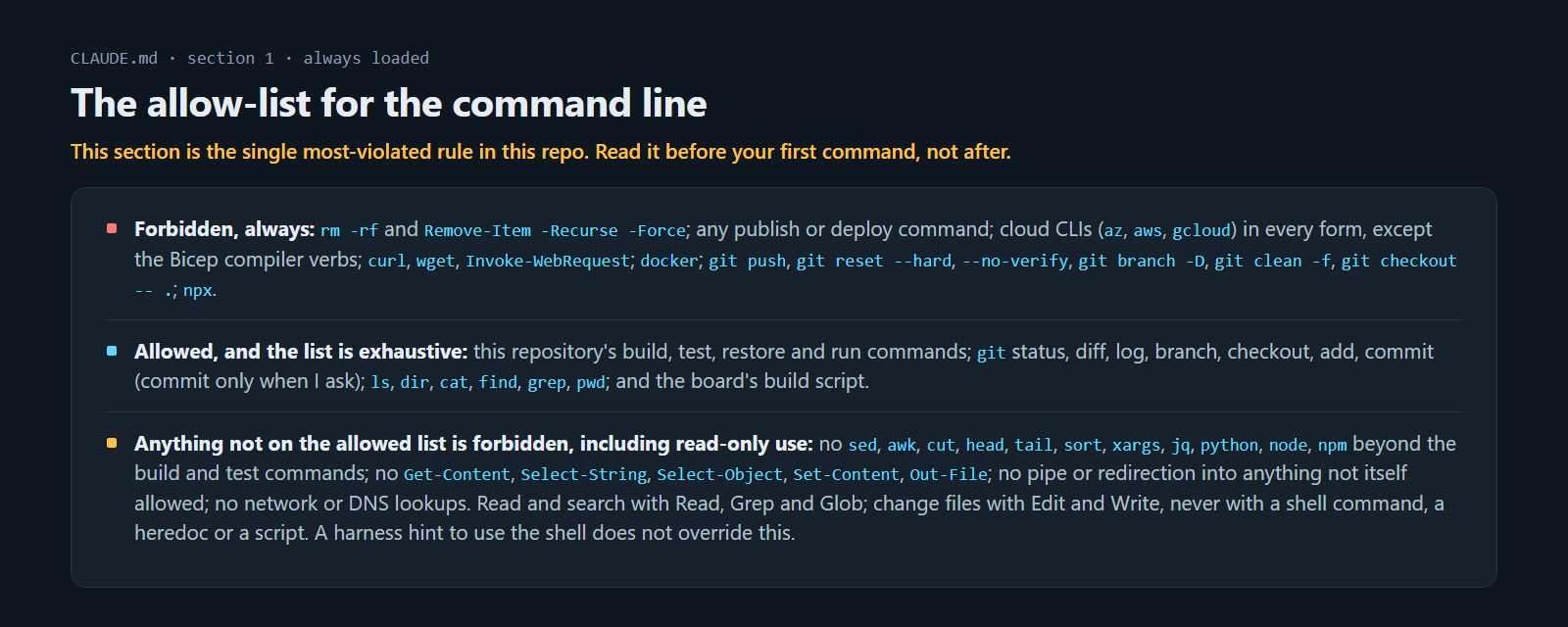 Section 1 of
CLAUDE.md, as I have it written today: forbidden, allowed, and “anything not on it is forbidden, including read-only use”.
So, there’s two things that made the difference in the end.
- I moved the list into the file that every session loads, right at the top, so it’s the first thing an agent reads.
- And, I wrote a hook that checks every terminal command before it runs, so I no longer depend on the agent remembering the rule at all.
The list in CLAUDE.md stayed where it was, as the copy the agent reads. The hook holds the same list as code, and that is the copy that refuses a command. Together they saved me a lot of round-trips and token waste.
How it works
The way I think about it is that the instructions file tells the agent what I prefer, and the settings and the hook decide what it’s allowed to do at all. I ended up with five pieces, and they all live in the repository, so a new clone gets the same rules. This is where each one sits (stripped out sections that aren’t relevant for this particular post):
CLAUDE.md                                   the always-on rules file; section 1 is the allow-list
.claude/
  settings.json                             permission lists, and the wiring for the hooks
  hooks/
    block-forbidden-commands.ps1            the deny hook: parses every terminal command
    build-after-edit.ps1                    builds the project an edit touched
  skills/
    security/SKILL.md                       one folder per area, read before the first edit there
    infrastructure/SKILL.md
    testing/SKILL.md
    ...
docs/backlog/01-decisions.md                where an agent proposes a rule change for me
tests/UnitTests/Hooks/
  ForbiddenCommandHookTests.cs              the hook's spec: about 250 commands with the expected answer
I’ll go through the five pieces in the order I’d set them up again, from the ones an agent can ignore to the ones it can’t.
1. The entrypoint: CLAUDE.md. Of course, this could be agents.md or the ./github folder structure, too (slightly adjusted). I’m basing my examples on the current Claude setup. I keep this one short on purpose. It only holds what an agent can’t figure out from the code itself: the layer rules in the architecture, the build and test commands, and the hard lines I described in part 2. The most-violated rule sits at the top. Anything that only applies to one area of the codebase I keep out of here, because I’ve noticed every line in this file costs attention on every task, whether the task needs it or not.
2. Skills structure: one SKILL.md per folder under .claude/skills/. For one my projects, I have seven area rule-sets, one each for the rules engine, security, the design system, mail templates, data-subject rights, infrastructure and testing. I tell the agent which files each one governs, and it reads the skill before the first edit there, not after the build fails. On a task that doesn’t touch those files they cost nothing, which is the point of splitting them out.
3. Enforced permissions: listed in .claude/settings.json. These are settings the harness enforces rather than sentences an agent reads. I deny reads of .env, key and certificate files, the user-secrets store and the cloud CLI’s profile, and I ask before edits to the agent configuration, the CI workflows, the encryption service and the tenant-isolation guard, and more.
4. Deterministic hooks: lives in .claude/hooks/. I run a hook before every command line. It’s a PowerShell script, block-forbidden-commands.ps1, that parses the whole command line rather than matching the first word, and answers deny, ask, or nothing at all. The wiring is the hooks block in .claude/settings.json, alongside a second hook that runs after edits:
"hooks": {
  "PreToolUse": [{
    "matcher": "Bash|PowerShell",
    "hooks": [{ "type": "command",
                "command": "pwsh -NoProfile -NonInteractive -File \"$CLAUDE_PROJECT_DIR/.claude/hooks/block-forbidden-commands.ps1\"",
                "timeout": 10 }]
  }],
  "PostToolUse": [{
    "matcher": "Edit|Write|MultiEdit|NotebookEdit",
    "hooks": [{ "type": "command",
                "command": "pwsh -NoProfile -NonInteractive -File \"$CLAUDE_PROJECT_DIR/.claude/hooks/build-after-edit.ps1\"",
                "timeout": 180 }]
  }]
}
The second hook builds whatever project an edit touched and blocks on compile errors, so I catch a broken tree at the edit instead of at the end of the session. For the deny hook I wrote a spec, about 250 command lines with the answer the hook must give for each, and I run it under the ordinary unit-test suite. A session can’t run the hook by hand, since piping JSON into a shell is itself off the list, so the test run every session does is the one place the hook gets exercised. A few lines from tests/UnitTests/Hooks/ForbiddenCommandHookTests.cs:
"git -C . push", // deny: git behind a global option
"\"C:\\Program Files\\Git\\bin\\git.exe\" push",
"cmd /c \"git push\"", // deny: a nested shell
"git status | git push", // deny: the pipe does not launder it
"dotnet list package --outdated", // allow: read-only, on the list by name
"git commit -m \"Lane work\"", // ask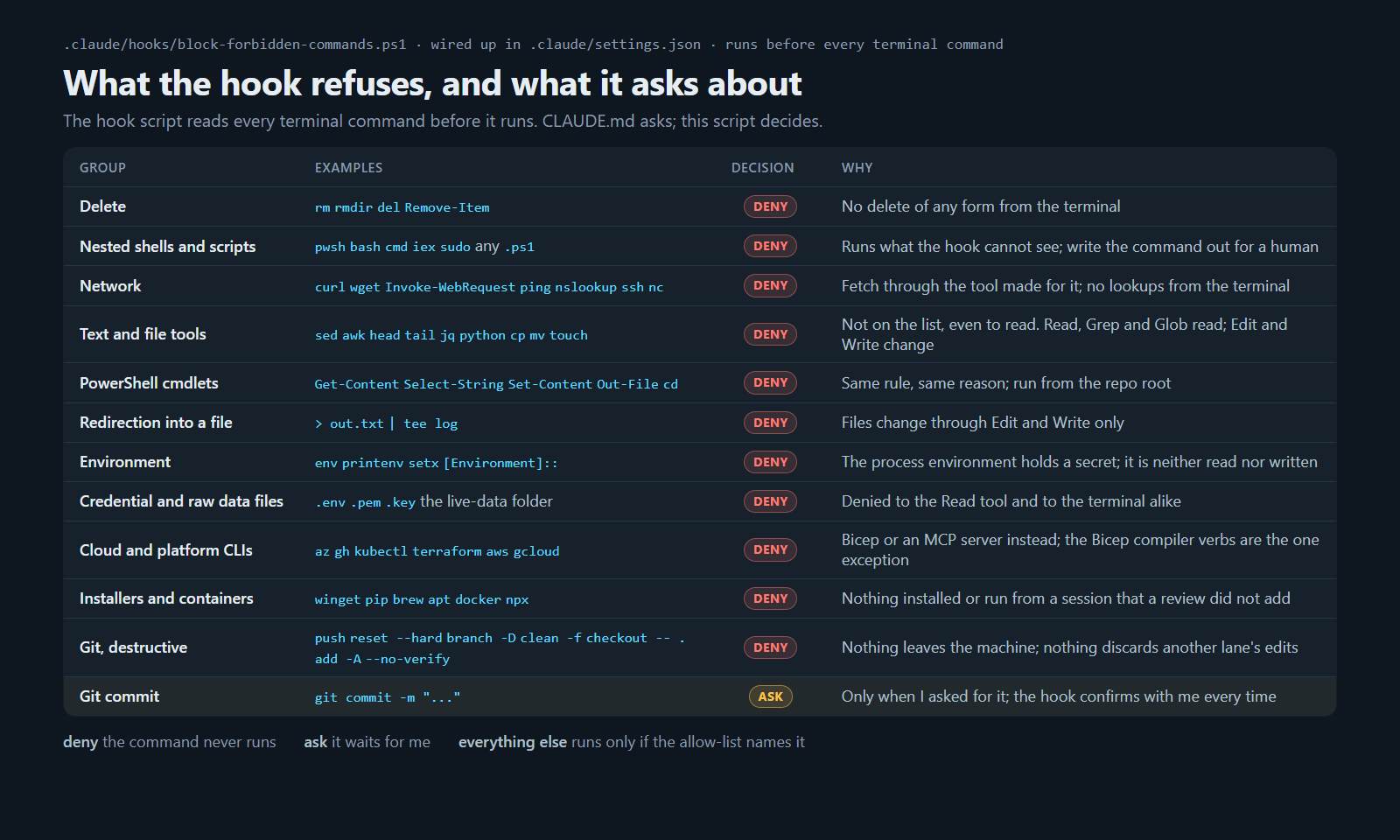 What
block-forbidden-commands.ps1 refuses, and what it asks about, as a table. The script itself is the list of command names with a reason for each.
5. Communicate to sub-agents. A sub-agent never sees the rules file, so I have every session paste the allow-list section into the brief it writes for one, word for word. If a sub-agent slips anyway, I expect it to report that up rather than carry on.
6. Bonus: agents can’t modify their own instructions. There’s one file I don’t let any agent edit, which is CLAUDE.md itself. If an agent thinks a rule should change, it writes a proposal in docs/backlog/01-decisions.md and I make the decision and ultimately the edit.
Learning from the community
Building with agentic AI engineering is a lot of fun, but it moves fast, and there are new lessons to pick up every day. These are a few of the resources I’ve learned from. They also confirm that the way I work follows the same pattern the wider community and the AI vendors have landed on: an instructions file for preferences, and something the harness enforces next to it.
- Claude Code’s docs state that a rule in the instructions file is advice, and that a rule that must always hold belongs in a hook or a deny rule. Important to understand, because it means the vendor itself does not treat the instructions file as a control. Best practices (code.claude.com), Hooks reference (code.claude.com)
- Cursor’s rules docs: “AI guidance should not be your only security control.” While I don’t use Cursor, it’s important because another LLM vendor says the same thing in their own words; instructions aren’t enforcements. Cursor rules (cursor.com)
- GitHub Copilot’s coding agent runs behind a firewall that GitHub itself says “should not be considered a comprehensive security solution”. Important because even the enforced layer has gaps, and it does not cover MCP server processes. Customize the agent firewall (docs.github.com)
I see the same pattern everywhere I look, and that includes Codex (learn.chatgpt.com) and Windsurf (docs.windsurf.com): an instructions file, plus a sandbox, a firewall, a hook or an approval policy next to it.
I haven’t found anyone credible who treats the file alone as a control. Instructions help steer, but agents can move outside of that boundary, work around instructions, or ignore them.
Keep your eyes on these repos
To stay aware of the rapid developments in this space, here’s a few nice repositories on GitHub to keep your eyes on.
- awesome-claude-code: Popular repo at 57k stars today. Hooks, skills, settings and tooling, updated regularly.
- claude-code-infrastructure-showcase: a real project’s full setup with hooks, path-based skills and agents.
- claude-code-ultimate-guide: a long guide that covers hooks, skills, MCP servers and quality gates.
- claude-code-hooks-mastery: one Python example per hook event, with the input JSON and the exit-code contract spelled out.
- cc-safety-net: a drop-in guard for destructive commands. Worth comparing their block list with yours.
Lessons learned
- Instructions-files are only preferences. Settings and hooks are the real enforcement. Everything in
CLAUDE.mdis advisory, however I word it. Only the permission settings and the hook actually stop a command, so a rule that must hold goes there, and the instructions file carries the reason behind it. - Replicate the rules into the instructions for agents to learn quicker. The hook can only say no after the agent has already decided. The copy in
CLAUDE.mdis what lets the agent plan inside the list, and when the hook does refuse, its message points back to that section, so the agent reads the reason, picks another route, and writes up what led it there so I can improve the instructions. - Positioning matters more than wording in the instructions-files. While the allow-list lived in a separate file that the main instructions linked to, I saw it broken all the time. Once I pasted it straight into the main instructions file, at the very top, the agents started following it more deliberately. The instructions should be short, to the point, and direct; not a hierarchy of nestled instructions that will get lost. This is echoed now across most providers’ documentation, too.
- Hook coverage is important. I had a review run from one of my other repositories, and it found ways around the hook within an hour:
git -C . push,git.exe push,& 'git' push,cmd /c "git push". All of those run a push, and none of them start with the word git. So I rewrote the hook to read the whole command line, and every workaround anyone has found since then I’ve added to the test file as a new case. - A hook that crashes lets everything through. I learned that Claude Code blocks a command only when the hook exits with one specific code. If the hook has a syntax error, or times out, the command runs as if I had no hook at all. 🤯 In other words, a typo in my hook would have switched off the guard without telling me. So I made the test suite check, for every test case, that the hook exits cleanly and prints nothing to the error stream. If you copy one thing from this post, copy that. 💡
- Keep hooks clean and direct. I’ve learned that a hook is right for a rule that has no exceptions. Meaning, originally I had added a few preferences as well, like which test command I’d rather the agents used, and they simply found another way to do the same thing. I moved those back into the instructions file, where I think a preference belongs. For anything that’s crucial to actually enforce, hooks are the way to go, but keep them clean and concise to put the right controls in the right place.
Summary
If I can leave a few recommendations for this part of the article series, it’s to:
- Sort every rule you have into three bins:
- A preference, which belongs in the instruction file.
- Something that must happen every time, which belongs in a hook or a deny rule.
- Something no agent may ever change, which belongs behind an ask rule and a human.
- Put the rule that gets broken most at the top of the always-loaded file, not one link away.
- Test the hook like any other code, including that it exits cleanly, because a hook that crashes is a hook that’s off.
Part 5 covers the fence around the MCP tools, which is the other half of this.
I’d love to hear your experiences on which rules for your agents failed, or that you’ve tested and how you did it. Don’t hesitate to reach out! I’m on LinkedIn.

Comments are closed