Agentic AI engineering is an article series on running coding agents on real codebases: what I do, what the agents do, what worked and what didn’t. I wrote this for engineering leaders deciding whether to work this way, and the engineers who would. At the same time, I’m hoping you’ll have some ideas to share back so we can all learn together.
- Agentic AI engineering: I steer, the agents orchestrate
- Agentic AI engineering: What the humans do, what the agents do, and where the hard lines are
- Agentic AI engineering: Why instructions aren’t enough for coding agents
- Agentic AI engineering: Multi-agent orchestration across lanes without conflict
- Agentic AI engineering: Read-only MCP servers by default, and never run as my own identity (this post)
- Agentic AI engineering: Lessons learned running coding agents, what broke, what failed, and what changed
Overview
In many of my projects, I give my coding agents three MCP servers: the Microsoft Learn MCP Server for documentation, a browser through Playwright, and the Azure MCP Server for direct cloud access to Azure. The Azure/cloud one is the interesting case, because it’s the one that could actually do real damage if done wrong. So I don’t rely on the server’s promise to be read-only. I fence it with identity and scope instead: a dedicated service principal with a reader role on exactly the resources the work needs, a credential chain I’ve pinned so it can never fall back to my own sign-in, and the read-only flag as a second, independent layer on top. Anything that would run as me I keep out of the session entirely.
I’ve come to think that read-only is something I can actually govern when it’s scoped like that, and in this post I’ll go through the fence as I have it today.
Context
Failing loudly is where I’ve seen this work best. When the principal’s secret or scope expired, rotated or changed, I decided it needs to fail loudly rather than try to fall back to the next identity option. No code, no fallback, nothing listed.
By deafult, the agents would have walked down the default credential chain, found my own signed-in developer identity, and quietly returned resources from every subscription I can see, including ones that have nothing to do with this project. Theoretically - on my machine, I’m never signed in with my own account to the cloud in the CLI, so the fallback will fail loudly for that reason, too; However by default, the tools anf agents just carry on with trying to get access, and then might return the wrong tenant or subscription, or to broad permissions.
Here’s a short summary of how I let my agents use these MCP servers, and what they can’t do.
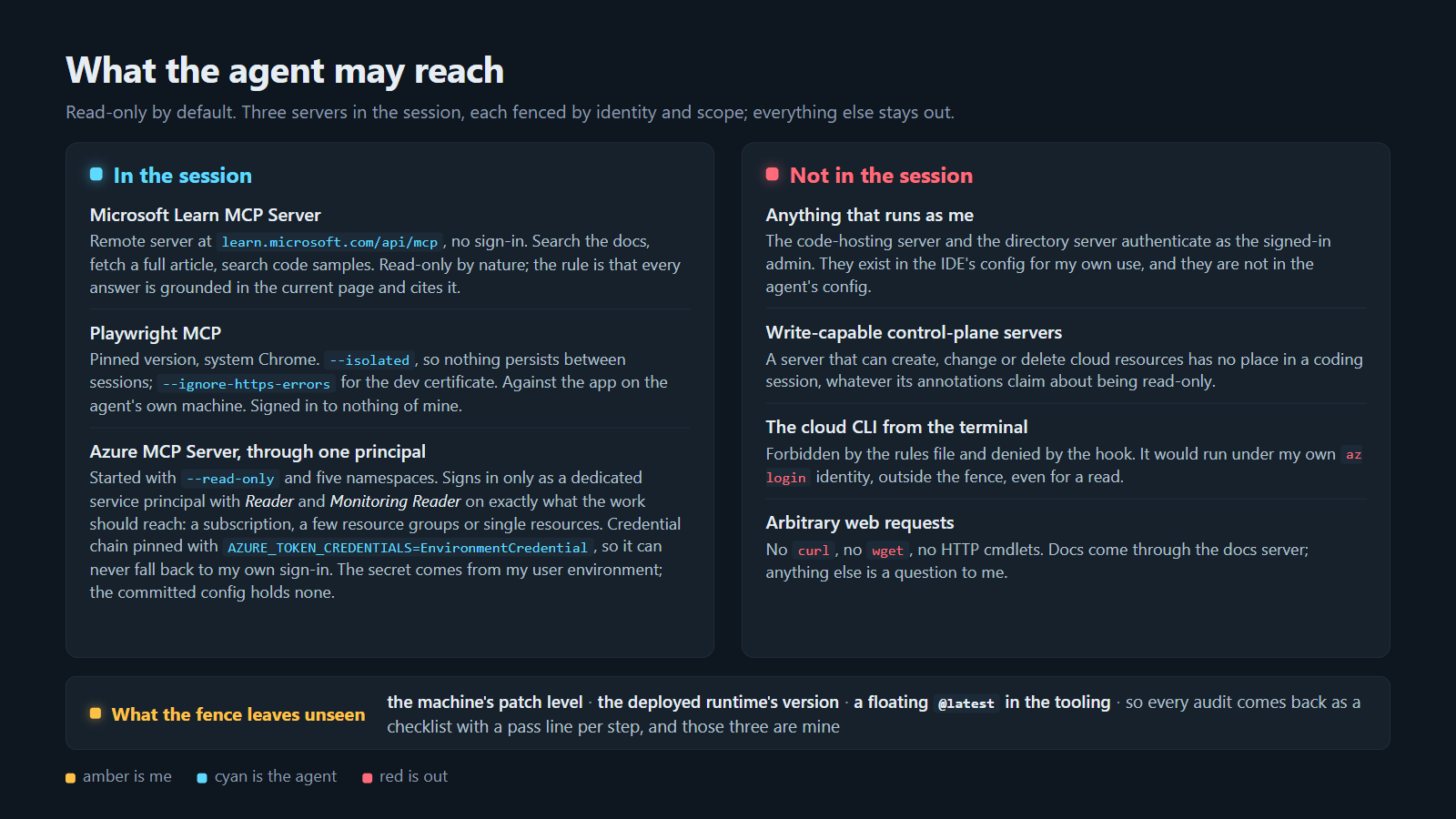 What the agent may reach: three servers in the session, each fenced by identity and scope; everything that runs as me stays out.
How it works
Define and design a read-only approach. Consider least-privilege and Zero Trust in everything you do.
So for every server I ask myself the same four questions and document the requirements/risks:
- Who does it run as?
- What can that identity reach?
- Can it write?
- What would it reach if the model is wrong about what it’s doing?
Exploring how I use my favorite MCP servers
Microsoft Learn MCP Server: Direct access to the latest published Microsoft docs
The Microsoft Learn MCP Server is a remote server at https://learn.microsoft.com/api/mcp, no sign-in and no key, and it gives the agents three tools: search the documentation, fetch a complete article, and search the code samples.
Microsoft describes it as bringing “trusted and up-to-date information directly from Microsoft’s official documentation”, with the index behind it doing a full refresh once a day, and that currency is the whole point for me. A model’s memory of an SDK or a resource type is months old on a good day, and the Learn page is today’s.
So the rule I’ve put on top of it is that anything the agents build on an Azure API, SDK or resource type gets grounded in the most relevant current Learn page first, every answer cites the page it came from, and any claim in the project’s docs older than a quarter gets re-verified against it before anything is built on it. I’ve had two “no API exists” conclusions in the project’s research turn out to be wrong when I had them re-checked, and the citation rule is the reason I caught them.
The four questions have easy answers here:
- It runs as nobody.
- It reaches public documentation.
- It can’t write.
- If the model is wrong about what it’s doing, it reads the wrong page.
Playwright MCP: Autonomous browser capabilities
Playwright MCP is Microsoft’s browser automation server.
- I pin it to one version rather than
@latestand let it drive the Chrome that’s already on the machine. - It gives the agents is the ability to open the page they just changed, read it and click through it, so “I think it renders” turns into “here is what it rendered”.
- It reads a page as an accessibility snapshot rather than a screenshot by default, which the README describes as “better than screenshot”, so the agent can find a button and its label without a vision model, and it takes a screenshot when I want to see what it saw.
- It runs against the app and the site on the agent’s own machine, and it’s also how an agent waits for a page to change, instead of a shell sleep.
Three flags carry the fence here.
--isolatedkeeps the browser profile in memory, so nothing persists between sessions and the browser starts signed in to nothing, every time.--ignore-https-errorsis for the dev certificate on localhost.--output-dirpoints at a git-ignored folder, so screenshots never land in the tree.
There’s an --allowed-origins option and I left it out on purpose, because the README says plainly that Playwright MCP “is not a security boundary”, and I’d rather not have a fence that only looks like one.
The four questions:
- It runs as nobody; with a fresh profile each time.
- It reaches whatever localhost serves, and in principle the open web.
- It can write to the page in front of it, which is the point.
- If the model is wrong about what it’s doing, it clicks the wrong button in a dev app it isn’t signed in to.
The one tool in it I treat differently is the one that runs arbitrary code in the server process, which the README itself labels as equivalent to remote code execution. I haven’t needed it, and using it would be its own decision, not a default. Again, less access is better and I’d rather sleep well at night than take any convenience in “oh, this seems to work and be efficient” - that’s how accidents happen and risks open up.
Azure MCP Server: Direct access to Azure
The Microsoft Azure MCP Server is started with read-only, authenticating as a service principal I created just for that purpose in that given project. It has tools for most of the services I use, so the question was never whether it can read. It was what the identity behind it is allowed to read. For example, you can configure the scope in the config file to be both read-only and only have access to specific namespaces:
"azure-dev": {
  "command": "npx",
  "args": [
    "-y", "@azure/mcp@latest", "server", "start",
    "--read-only",
    "--namespace", "subscription",
    "--namespace", "group",
    "--namespace", "resourcegraph",
    "--namespace", "monitor",
    "--namespace", "applicationinsights"
  ],
  "env": {
    "AZURE_TENANT_ID": "<the dev tenant>",
    "AZURE_SUBSCRIPTION_ID": "<the one dev subscription>",
    "AZURE_CLIENT_ID": "<the reader principal>",
    "AZURE_CLIENT_SECRET": "${DEV_MCP_CLIENT_SECRET}",
    "AZURE_TOKEN_CREDENTIALS": "EnvironmentCredential"
  }
}
A few reflections on the experiences here to tighten the loop.
The principal holds Reader and Monitoring Reader on the one development subscription scoped to specific resource groups and nothing else, so anything outside it returns a 403 whatever the agent asks for. I set AZURE_TOKEN_CREDENTIALS to a single credential name, which collapses the default chain to that one credential. No fallback. The Azure Identity documentation on credential chains puts it as “To exclude all credentials except for one, set environment variable AZURE_TOKEN_CREDENTIALS to the credential name”, and the server’s own authentication notes say the same thing, so there’s no fallback to the CLI, VS Code or PowerShell sign-ins on my box. The secret resolves from my user environment, so the committed file holds none. And I keep --read-only as the second layer, because I don’t consider either layer sufficient on its own. The Azure MCP Server tools page documents the start parameter as “Whether the MCP server should be read-only. If true, no write operations are allowed”, and the same page says access “is secured through Azure Role-Based Access Control (RBAC)”, which is the docs saying what I’m saying: the flag limits what the server does, the role assignment limits what the identity can do, and I want both.
Role assignment scope. The scope of the role assignment is the part I decide per project. Azure RBAC lets me assign a role at four levels, management group, subscription, resource group and resource, and lower levels inherit from higher ones. So the reader principal gets exactly what the development work should reach, and nothing above it. When the workload lives in a few resource groups inside a shared subscription, Reader goes on those groups. When the agent only ever needs to look at one storage account and one Log Analytics workspace, it goes on those two resources. The read-only flag rides on top in every one of those cases. Without the scope, the flag is a promise about behavior; without the flag, the scope depends on nobody ever widening that role assignment.
Namespaces help narrow access. They decide which tool families the agent is offered at all: subscriptions, resource groups, Resource Graph, Monitor and Application Insights, which is what reading a dev environment takes. The model never sees a Key Vault tool it has no business calling, so there’s less for it to get wrong and less noise in its tool list. I count that as convenience, not as a layer of the fence. The boundary is still the role assignment.
The tenant and subscription in that file are defaults, not boundaries. Every tool on the server takes tenant and subscription parameters that override them. The only real boundary I have is the role assignment.
What I don’t use: a few rules of thumb
Anything that runs as me. The code-hosting server and the directory server both authenticate as the signed-in admin, and I find them useful; I use the directory one myself to capture real fixture data from the dev tenant. But I keep them in the IDE’s own MCP configuration, which the coding agent doesn’t read, and not in the agent’s. If I ever found one of them unavoidable for an agent, I’d give it a dedicated account with the least access that still works, never a default account.
Write-capable control-plane servers. I don’t see a place in a coding session for a server that can create, change or delete cloud resources, whatever its annotations claim. The Model Context Protocol’s own blog put it plainly in its March 2026 post on tool annotations: “Every property is a hint. They aren’t enforcement,” and “a server can claim readOnlyHint: true and delete your files anyway.” I put the security boundary in the authorization layer, not in the tool’s description of itself.
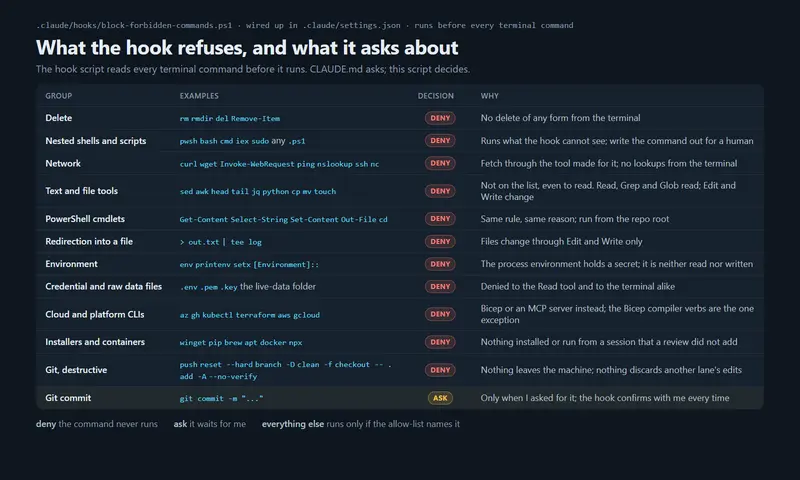
The cloud CLI from the terminal. I’ve forbidden it in the rules file and the hook from part 3 denies it, including for reads, because it would run under my own az login identity, outside the fence. The one exception I make is the Bicep compiler verbs, which take local files in and produce ARM JSON out, with no network call and no credential. What-if deployments are read-only, but they call the control plane as me, so I have the agents write those out for a human to run.
Arbitrary web or CLI requests. No curl, no wget, no HTTP cmdlets. Documentation comes through the docs server, and anything else is a question to me. I’ll add that GitHub’s own docs on the Copilot coding agent say its firewall, which is on by default, “does not directly apply to MCP server processes” (Customize the agent firewall), which is one more reason I put the fence around the identity rather than around the network.
Lessons learned
- Fail loudly. Pin the credential chain so it doesn’t fall back to my own sign-in credentials. Fail loudly so you catch it and fix it, rather than let the tools inherently try the next option, which typically is your own identity.
- Role assignment for permissions, configuration for convenience. Many tools, including several MCP servers, have options for both read-only and write; and even when launching some tools in read-only, they’d flip over to read/write mode at their own convenience. Tool parameters can override things, too. So, the real containment here is the actual RBAC/role assignment for permissions, not how you configure the MCP server to use the credentials; if the credentials ultimately have Contributor/writer or more access, the tools might do dumb stuff, and it’s happened more than once for popular agents and MCP servers alike.
- Scope to the work, not to the account. Think Zero Trust and least-privilege here. Grant RBAC/role based access control only to the least required privilege for the work to get done. Subscription, resource groups or single resources, whichever matches where the development lives. Less cloud estate to access, less risk.
- “Did you turn it off and on again?” - especially after a secret or credential rotation. After a secret rotation, a 401 with no error code is a stale environment block in the editor, not a permissions problem - something that bit me a few times when trying figure out why the agent couldn’t access the updated read-only grants in Azure. A full restart of the editor fixed it, more than once. So, the classic “did you turn it off and on again”, and it still applies to agentic AI :)
- Never trust documented ‘read only’. I’ve worked rigorously with security, compliance, privacy and risks. It’s clear that many of the MCP tools, and other tools your agents may or may not use, can claim to be read-only but in fact they’d easily fall over to your signed-in identity or simply have more than read only access. Hence, scope the permissions and access, and lock down what can be accessed.
- I stay signed out of the CLIs. To avoid any risk of agents falling back to leftover credentials from other sessions, I never have any CLIs signed into accounts with any type of real access. Ideally, you set up a specific identity for the work that needs to get done, grant the required access, and if there’s ever a fallback to those credentials, they’re already limited in scope and designed with least-privilege in mind.
Summary
Working with agentic AI engineering is amazingly fun, and leveraging the right tools at the right time will increase your efficiency by an exponential magnitude. The less time I spend on fixing what went wrong, the better the outcomes. When you control the entire estate, including what the boundaries of your agents are, you will sleep better at night. At least I know that I do.
I’m curious which of your agents’ tools run as you, and whether you decided that or it just happened. Don’t hesitate to reach out! I’m on LinkedIn.
Comments are closed