Lately I’ve been rolling around parts of Sweden and doing training, seminars and workshops on SharePoint 2010 with a bunch of companies and people.
One thing that I’ve been showing off, which I’m totally in love with by the way, is the BCS (Business Connectivity Services) functionality.
I’ve been getting a few questions from people who have been trying this out, but stumbled onto some problems with it in terms of permissions when they tried it out themselves.
Problem – Access Denied by Business Data Connectivity
When you’ve created your external list and try to access it (even as the same user, Administrator, that created it) you might get the following error:
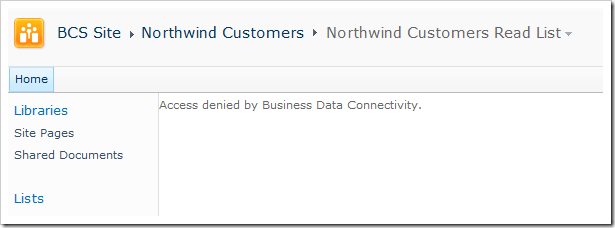
Access denied by Business Data Connectivity
If you bump into this, please don’t freak out – just keep reading..
Solution – Permissions on the BCS Entity
To resolve this so called problem, follow along here:
Go to Central Administration -> Application Management -> Manage Service Applications -> Business Data Connectivity Service* -> [Your Entity] -> Set Permissions
(* or whatever name you’ve chosen for your BCS Service application)
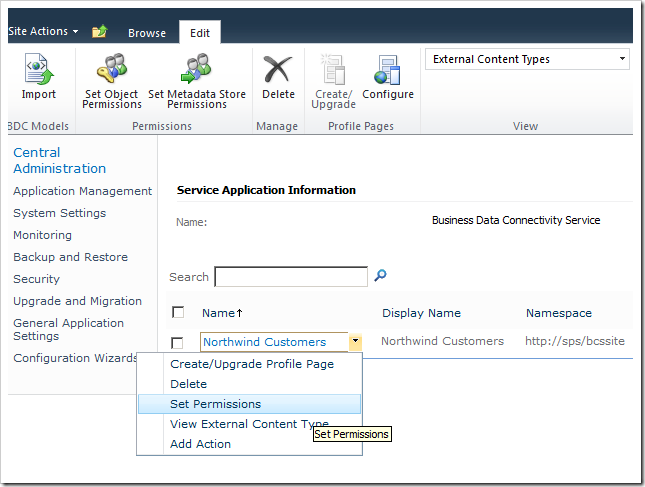
SharePoint BCS Service application permission configuration.
Configure the actual permissions
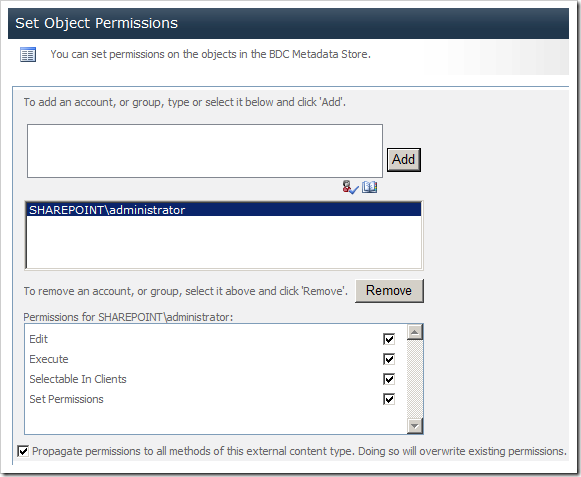
In my case below, I’ve just told SharePoint that my Farm Administrator should be able to do all actions (Edit, Execute, Selectable in Clients and Set Permissions)
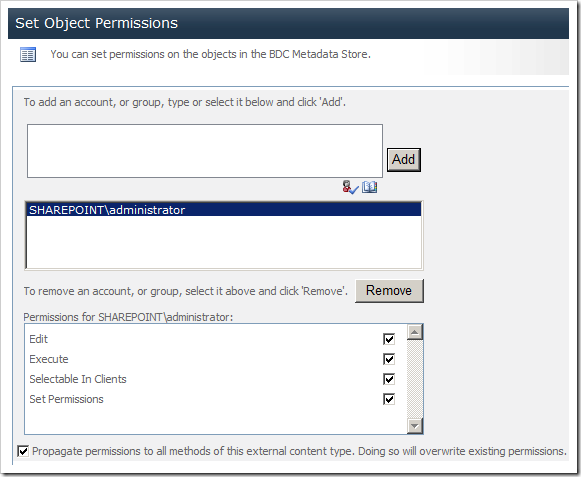
Grant the proper permissions for BCS in SharePoint.
Please note: You might want to use different permissions in your environments – the permissions set in this blog post is just to demonstrate how you effectively change/add permissions for your BCS Entities to get up and running.
You will most likely be required to performa an IISRESET at this point to force SharePoint to understand what just happened :-)
Check your external list
You should now be able to access the external list and see the desired result.
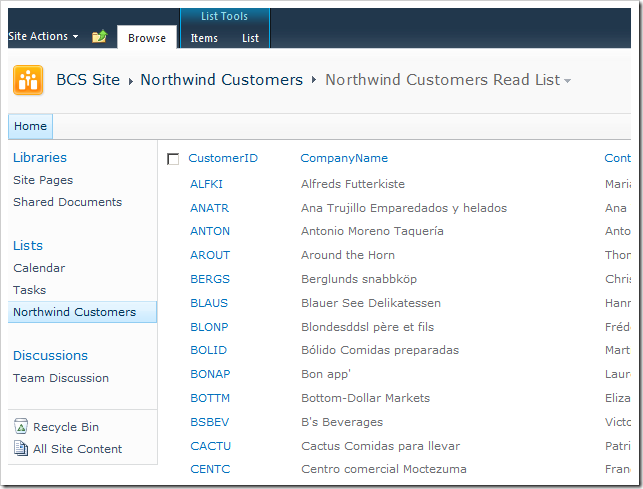
Edit: As mentioned in the comments by David Parra, you can in some cases set “Metada “Metadata Store Permissions” if the other attempts fail. Just remember to always do an IISRESET after you’ve set the permissions.
Keep rocking folks!
Cheers


Comments are closed
Archived comments
Thanks for the tip. I might have spent ages searching for the place to edit these permissions.
I'm glad I could help, Adam.
Tobias, thanks for the tip. I crossed the access denied page after setting up the permissions as you mentioned. However, after doing so, i get another error msg :
"Unable to display this Web Part. To troubleshoot the problem, open this Web page in a Microsoft SharePoint Foundation-compatible HTML editor such as Microsoft SharePoint Designer. If the problem persists, contact your Web server administrator.
Correlation ID:355457d4-e452-4b98-ada6-2b7c674f07b8"
I am trying to connect to an external system (CRM 2011 in this case) using BCS. Any help from your side would be greatly appreciated!
Hi Mohdubaid,
I'm glad you could progress a bit further in your problem - My best bet to start investigating your issues that are now occuring is to enable the ULS Logs (if they aren't already) and then monitor the logs with ULSViewer to see the details of the error message.
The message you posted is a generic SharePoint error message and doens't give us any information - get the log tools and fetch the logs to see what they can tell us. See this post for further details on the logs: http://www.zimmergren.net/t...
I tried all this without success.
But it finally worked once I set the "Metadata Store Permissions" as well...
2 days wasted because of this, and it is not mentioned anywhere else...
Hope it could help somebody
Cheers
Jose
Hi David,
Glad to see you got it resolved. Good tip with the Metadata Store Permissions, may update my article to reflect your comment.
Cheers,
Tobias.
Please do. Seems like an critical part!
i make what u did , and also what the article did but still i have the errror :(
This was very useful. Thanks
Thanks Veena
great article Tobias! no need for IISRESET, patience is a key here ;) after few seconds (in my case less than a minute) it sorts itself out...
Yep, it normally should work. Sometimes the easy way out is to just do the app pool recycle :)
I tried setting both Object Permissions and Metadata store permissions and still can't access to my external list...
IISRESET after your changes?
I'm trying the Sharepoint Online and encountered this problem. Is there a solution? The Central Administration is not an option in SP Online. Please help.
Works fine in IE , no luck with others browsers (Chrome, Firefox, ...). I still have an error.
Anyone got a clue?
Just a random thought; Have you tried doing an IISRESET and clearing the cache in the browsers? (Shouldn't be needed, but worth a shot)
No luck with that, cleared everything, resetIIS and even restarted the server. Still only IE can get through
Hai it is good and helpful for me but i am crawling the LOB i am getting the Error that is Error while crawling LOB contents. ( Access denied by Business Data Connectivity. )
if we know any one how to rectify this error and get search results .Please share me any information available to get the LOB data results.
Thanks,
Suresh
Hi Tobias,
Thanks for the article, its works, but when i create external content type list and then i create an application using this list, also i stopped inheritance permission too, so this list have the unique permission, the new user can't access the application, the warning is "access denied by bussiness data conectivity", so, how to grant permission to user non administrator? it is harmful to add user one by one in central administrator?
Thank you
Thanks for the article, this helped me to resolve the BCS access denied issue. Saved a lot of time :)
I'm glad it helped :-)
Cheers,
Tob.
Hi Tobias,
Thanks for the article. Any ideas why I am getting 'Unable to render the data. If the problem persists, contact your web server administrator.'?
I looked through the correlation ID in the log files but didn't see any High's there or any access denied.
HI Tobias,
Do we have a way to resolve this issue for Public Facing sites with anonymous access?
We are working with a SharePoint 2013 farm.
Daniel, did you find a solution for public facing sites with anonymous access? I love if you'd share it
Hi Kim,
You can refer to my article at
http://social.technet.micro...
Hi Tobias ,
I am facing an error as "Access denied . you do not have permission to perform this action or access this resource " .....
It occurs when i create a new external list , please help to solve this....
Cheers
Indresh
Hi Indresh,
Did you follow the steps outlined in this article to set the correct permissions on your BCS entities?
Tobias.
Can you clear me is it possible to fetch BCS data in Infopath DDL .