In one of the projects, we’ve looked at various solutions for providing analytics to users, site owners, and system administrators. Most services offer an excellent way for web admins or site administrators to review how their site or system is being visited – but there are few options for letting the users of your system review specific data themselves.
To get around this, I built on top of the Google Analytics APIs, enabling my application to post queries for analytics data directly to the Google Analytics API. This allows (for example) a site owner to review data specific to his site.
In this post, I will not outline the technical steps but focus on the solution from an architectural standpoint. I may post that later if someone is interested in setting up such a solution.
Google Analytics?
SharePoint already has a lot of built-in Analytics functionality, so why would one want to integrate Google Analytics into your portal/intranet?
First, SharePoint’s analytics isn’t even close to being as advanced as the Google Analytics service, and there’s no good way to compare both. After conducting various studies and trial-and-error runs, the decision falls quickly on Google Analytics.
Just remember that if you are to choose an off-site hosted solution for analytics (or anything else), the data flow over the internet. It would help if you were careful with what information you choose to push into the cloud, whatever the service.
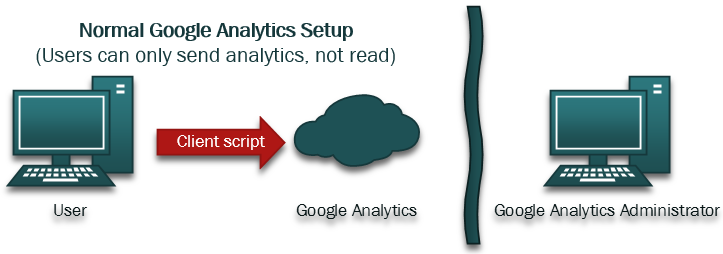
A typical setup for Google Analytics looks like this:
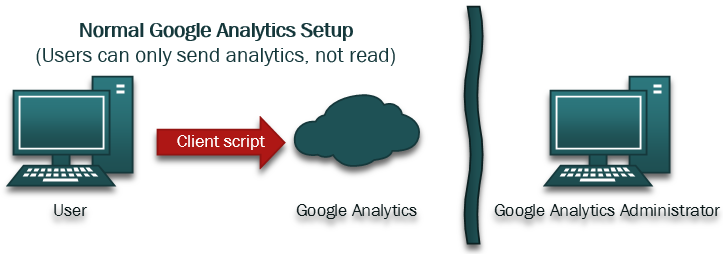
In this type of setup, which most people use, the system users get a client script loaded in their browser, which then communicates with the Google Analytics service to store information. Then only the administrators of the Google Analytics service can access and review the data.
We want all users, without the need to authenticate or navigate away from the portal, to be able to review data for their specific sites.
Solution Architecture
Right, we’re running Google Analytics, and we’ve had it integrated into our solutions for a while now – how do we enable GA Administrators to review analytics data and end-users in their own portal?
What we want to achieve is this:
- Users should be able to see live analytics data of their sites (Owners)
- Users shouldn’t need to have an account in Google Analytics (ponder that you’ve got thousands of users, you wouldn’t want to manage that…)
- Users should have the data easily accessible from SharePoint.
Custom WCF Service as a Google Analytics API wrapper
I decided to wrap the Google Analytics API through a custom WCF service where I can expose the specific analytics queries we want to enable for the users. By doing this, we can have our custom service take care of the following:
- Authentication toward the Google Analytics API’s
- Contains a set of specific methods to request very specific queries only - This makes it impossible for the user to hijack the request and alter it, should there be a genius out there..
- Takes the current Site Url as a property for filtering the GA request, only returning data relevant to the specified site URL
- Enable REST-formatted queries for easy jQuery requests in JSON format
The logic of the solution ended up something like this:
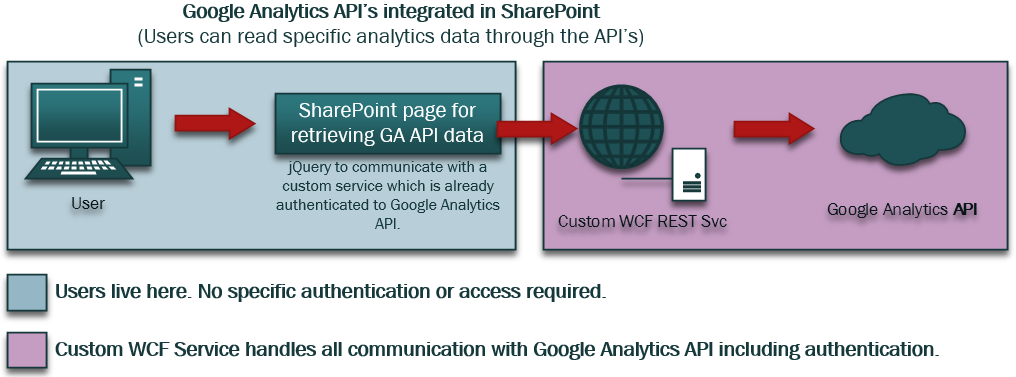
Breakdown:
- The user navigates to a custom Page in SharePoint, just like any other
- The Page has a jQuery script to request information from our custom WCF service
- The WCF service first handles authentication et al, then passes on the query to the GA API’s
- The WCF service, upon receiving the response from Google Analytics, returns the data in JSON
- The jQuery Page handles the JSON response and neatly pushes it into the Page for the user to review
By utilizing the stand-alone WCF service we could get rid of all the clutter of authentication, configuration and processing of the GA API service and only focus on exposing WCF Methods for the tasks we need, hence enabling a pretty neat asynchronous interface through jQuery for the users.
Summary
The Site Owners are happy because they don’t have to send a ticket or request information from the system administrators as soon as they want to review some data about their sites.
The Administrators don’t have to handle requests to enable site owners to see their statistics.
And yes, with this solution, we enabled many features that the built-in tools couldn’t handle, and we didn’t have to buy any of the expensive third-party offerings for this.
Everyone’s happy, which makes me happy!
Enjoy.


Comments are closed
Archived comments
hi tobias. this looks great but it would be benefital to see how it has been implemented with the solution and code if possible. can u share this info somehow?
i like for users to be able to see their statistics but without needing an account in google analytics just like this.
Hi Berthard,
Thank you for your comment. You will need an account in Google Analytics for the administrators, but if you setup your API Keys you can utilize the API's to query and retrieve the information.
I might do a follow-up post with more details.
Cheers,
Tobias.
I have been looking for similar offerings for a while and this is promising stuff. Would you mind sharing some pieces of your implementation? Especially how your WCF service handles the custom metrics in GA.
Hi Alan,
Thank you for your comment. I'll see if I can write a new post about the technical details as well, which should give you the details on how to handle the communication and queries. The WCF service has a set of pre-defined methods based on use cases for our implementation, but could also utilize a "custom query" method where you push in the query with custom metrics etc (whatever is allowed through the API's can be done).
Cheers,
Tobias.
Just today another client asked for integrating GA with their SharePoint, what a coincident. May I have a copy of your code as reference? Email: heyzz(a)hotmail.com. Much appreciated!
Hi Alan,
I can't really send you all the code for this, sorry. But as a coincicent I was looking for new clients that need this solution, feel free to have them e-mail me directly. Much appreciated ;-)
Cheers,
Tob.
HI Tob,
Really great job you have done.
we have a requirement to fetch data from google API's and want to show it in our SharePoint Online Pages...
Could you suggest me how to achieve this challenge.
Thanks in Advance.
Maheswar
Hi Maheswar,
Glad you liked my post.
The approach for displaying the data in SharePoint online would be essentially the same, except that instead of using an Application Page for rendering the result I would do it inside of a provider-hosted app or simply a generic HTML page inside your site collection, which will communicate with the backend WCF service (which you'll have to build yourself, as mentioned in the post).
Hope this helps :-)
Regards,
Tobias.
So just to clarify, is this solution able to be used in an Intranet environment that cannot be accessed externally to a company's network? And does this need to be done individually on each page or something that is just added to a global master page?
Hi Mike and thanks for your comment,
Well that's up to you as a developer really. In my case, this is only accessible from inside the network on the Intranet because nobody on the outside should be able to see stats from the intranet. As long as Google Analytics can run and send stats (which it does using the client, not the server) it should work - if your network allows communication with the GA API's, of course.
As for where the application will be presented to the users, that's really up to you.
In our case I've created an Application Page which is accessible from the "Site Settings" menu by administrators/site owners. This enables them to review stats for their own sites. Should you want to pin it down ti single pages to see their stats (which I think may be a bit overkill to be honest) then you could do that by using a custom action that launches a dialog with your application page and the proper parameters passed in as a query string or whatever solution you'd prefer.
All in all, it's highly customizable and it works very well.
Cheers,
Tobias.
we have talked to many isvs about their analytic solutions but they have all been very expensive and does not provide same insight as the google does. this looks very interesting and i think i will talk to our developer teams to see if they can build something like this too if it cuts our costs and if it manages to be a good solution.
i like the idea of having a service handle the authentication for the google service and to not have this in the sharepoint code and only use javascript there. if we were set this up in our farms would it be easy to develop this our self?
Hi Johnnie,
Thank you for the comment. Yes, be sure to pass on the information to your developers - I'm pretty sure they could build this stuff up. It would be interesting to hear what vendors you've checked out in order to see what features they offer.
As for developing this yourself; Yes it's pretty straight forward. Get a grasp of the Google Analytics API's and you're good to go. There's various flavors of the API and for my project the best suit was the .NET assemblies which can be fetched through NuGet.
Check out more on the API's for documentation and instructions for your developers: https://developers.google.c...
Cheers,
Tobias.
Hi Tob,
Is there any follow up post for this? I am also in similar situation where I need to implement custom solution to show stats to users on a page. can I able to pull the user details by this method(which GA can not provide) or only pulling the data to SP from GA without any administrative privileges on GA. I am looking for the solution in SharePoint intranet site.
Regards,
Vinnie
Hi Vinnie,
Sorry, I haven't had time to publish a follow-up to this topic.
GA doesn't store SharePoint user details in that sense, so you can't get that from a standard implementation of GA. Pulling data from GA back to SharePoint is pretty straight forward if you're using the Google Analytics API's. In order for users not to authenticate and just have read-access (or however you want to design it) you can create a custom WCF/REST endpoint as a service (which is what I did) and then have it authenticate to GA from that service, then users have read-access to your local service and can post queries and get results without the need to authenticate with GA.
I'll see if I can make time to publish a more detailed follow-up sometime in the future.
Cheers,
Tob.
can you post up some screen shots .. how is the data returned by GA rendered?
Hi Abdul,
I'm afraid I can't post any screen shots due to NDA restrictions.
However, related to how the data is rendered - that's simply a matter of preference. In my case I'm using a set of jQuery frameworks which automatically formats the JSON data into nicely manageable, sortable and filterable HTML tables. It doesn't have to be harder than that :-)
Tobias.
Hi, im using sharepoint and google analytics are already integrated throughtout the whole site. what i want is to make the analytics deliver a report only for one site and its sub pages, how can i achieve this?
Hi Asraaf,
In Google analytics you can filter based on Url's for example, that's available in the Google Analytics UI. If you're doing it programmatically then you can filter based on Url's and exclude everything you don't want to retrieve.
Regards,
Tobias.
How to add user information - User ID in the analytics ? Also can we add some custom attribute of user as well like Department ?