Update 2019: This post is updated with screenshots based on SharePoint 2019.
Update 2016: This post was initially written in June 2008. The User Information List still exists in SharePoint 2016 and onward.
Note: This list is only visible to and accessible by administrators.
Updated quick links for common troubleshooting:
- How to remove deleted users from SharePoint (Someone is deleted from Microsoft 365 Admin center, but still appears in SharePoint).
User Information List – Background
In SharePoint, we have the User Information List in SharePoint, which stores information about users. Some examples are Picture, Email, DisplayName, LoginName, and more.
For a complete list of fields, see further down this blog post under “User Information List Fields”.
Something to note is that when a user gets access to a site, a new item will be created in the User Information List, storing some information about the user.
When a user adds/create or edit an item, SharePoint will display something like Last modified at 1/1/2008 by Tobias Zimmergren like the following pic:

A screenshot of the Hidden User Information List displaying modified and created metadata information by SharePoint system.
In this example the DisplayName (used to display System Account) is gathered from the User Information List.
Browsing the User Information List
The User Information List can be accessed, if you’re an admin, via the browser by navigating to /_catalogs/users/simple.aspx from your site. For example, like this: https://intra.zimmergren.net/_catalogs/users/simple.aspx.
Updated 2019: This works on SharePoint 2007, SharePoint 2010, SharePoint 2013, SharePoint 2016, and SharePoint 2019.
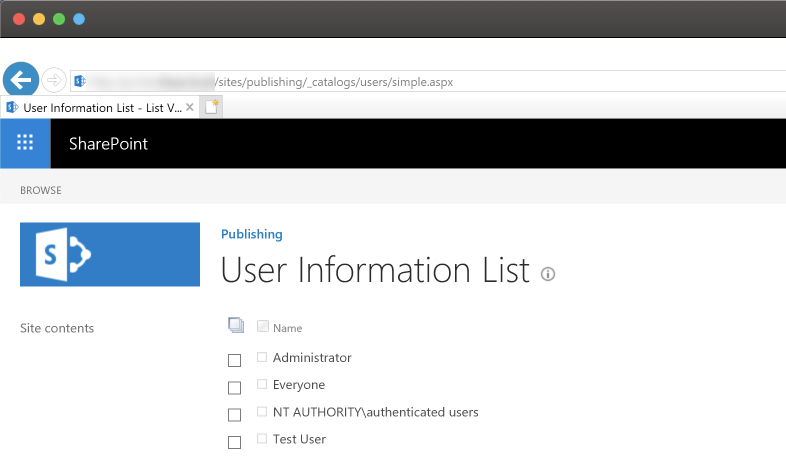
In SharePoint 2019, the User Information List looks like this:
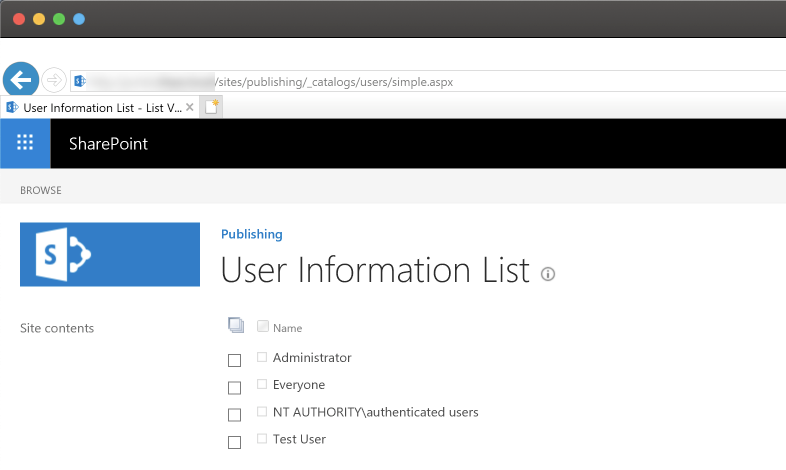
User Information List in SharePoint 2019 - showing the users on this specific publishing site.
In SharePoint 2007, the User Information list looks like this:
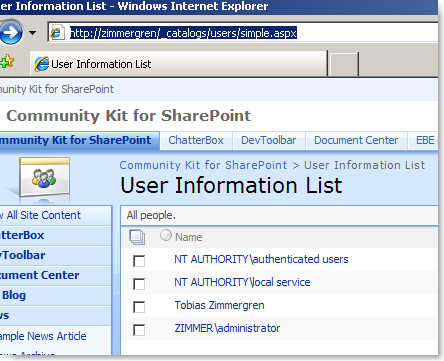
SharePoint’s hidden User Information List in SharePoint 2007 (WSS and MOSS).
Oh, the memories of WSS 3.0 and MOSS 2007. Good times 🚀
Write code to interact with the User Information List.
If you want to interact with this list to set properties on a user (In my case, I’m doing this, and I’m using WSS 3.0 at the writing of this post) you could do it like this:
// Instantiates the User Information List
SPList userInformationList = SPContext.Current.Web.SiteUserInfoList;

// Get the current user
SPUser user = SPContext.Current.Web.EnsureUser(@"ZIMMERGREN\TobiasZimmergren");

// The actual User Information is within this ListItem

SPListItem userItem = userInformationList.Items.GetItemById(user.ID);
The above code will give you the SPListItem object, which links to the currently logged in user (the one executing the request).
You can then work with the SPListItem object like usual to get or set the properties like this:
string pictureURL = userItem["Picture"].ToString();
User Information List Fields
Instead of writing out all the fields/columns available, you can create a new Console Application and insert the following code to output all the fields names and internal names:
SPWeb web = new SPSite("https://intra.zimmergren.net").OpenWeb();
SPUser user = web.EnsureUser(@"ZIMMER\tozi");
SPListItem item = web.SiteUserInfoList.Items.GetItemsById(user.ID);

foreach (SPField f in item.Fields)
{
  // Output on all the existing fields
  // and gets their InternalName as well
  System.Console.WriteLine("Title: {0} -- {}",
    f.Title,
    f.InternalName);
}
Thank you for reading
While this post was originally authored in 2008, the User Information List is still there, and still having its purpose. Things have changed, and there are other ways to interact with the list today (2022 and onwards).
Enjoy.


Comments are closed
Archived comments
wow that was really helpful, thanks
Hi Barış Engez,
You're most welcome.
Cheers,
Tobias.
it seems that not all items are available through this method... Picture, Title, etc. are ok, but eg. Fax or other custom fields won't show up. is there a possible solution, or even a info which fields are available to query using this method.
Hi,
Then you need to use the User Profile API's, not the User List. To fetch mapped properties and imported properties from the AD I'd recommend using the User Profile classes instead. That is for SharePoint Server, not Foundation/WSS though.
Cheers,
Tobias.
Hi. Useful post. Have a question though. If it's a list like others on the site, will custom event handlers work? For example if i want to handle the event when a user is added to a particular group or deleted from one? Did you ever get a chance to try that?
Hi Surya S Mishra,
As for events on the User Information List, please refer to this article: http://msdn.microsoft.com/e...
You can see a section telling you this:
"List events are not raised on the UserInformation list type. Resolution: None."
I'm not sure if this has been taken care of and if there's way to handle it today - however you could also try parsing the audit logs (first turn on auditing) and then query the audit logs for changes in the groups. That would mean some delays between the group being changed and the event being fired though..
Regards,
Tobias.
tack Tobias!
Sharepoint was driving me nuts as a newbie.... this has helped.
Inga problem, Kate!
You're most welcome - I'm glad I could help :-)
A quick question, I am having an issue when accessing SPContext.Current.Web.SiteUserInfoList in Anonymous access mode... Is there a method to access this List in Anonymous mode.. My site will be Public Facing and I need users info :(
Please help!
Arsalan Adam Khatri
Arsalan Adam Khatri,
You could try Impersonation in various ways to access the various restricted parts of the API. One example to start with is to wrap your code in a SPSecurity.RunWithElevatedPrivileges method.
Of course there's a reason for why some things are not available in anonymous mode - so be sure to design it in a way that doesn't compromise your system.
Regards,
Tobias.
Hi Tobias,
This is a good info Thanks.
I have an issue in WSS 3.0 that when i add a user called "user1" it picks the login name correctly but in the "display name" and "Email id" field it shows others ( user2's) display name and email id.
This happends for only one user all others are fine.
Hi Sankarlal87,
I haven't seen this behavior before. Would you mind verify that you get the same behavior on other site collections or web applications as well?
Regards,
Tobias.
Hi! This is an AWESOME discovery. I'm having a problem applying it because I don't know where I got o copy and paste this information. I have full access to my organizations SP site. I work with a vendor who is accountable for the customizations to our site. However, due to our financial situation, our contract is on hold. while waiting, I'd like to be proactive and apply what I need to. could you provide me a step by step description/guide/explanation on how I can do this?
I went to sharepoint designer and posted this information into the code view and I just got the code. I went into a page and inserted a content editor web part and the same happened. Where do I have to go? I mean literally after you log into the SP site.
Hi Sun,
I'm glad you liked it. I am however not sure about what you want to achieve. What would you like to customize or what would you want to do with your SharePoint site?
Let me know some more details and I'll see if I can help you out.
Cheers,
Tobias.
Hi Tobias,
I just would like to create an active users web part in an external facing website that I am building in SharePoint. I'd like the user part to show a picture of no more than 5 of our active users in our site. Next to their image would be 1 column with 3 rows of information: Name;Company;City,ST.
Active would be anyone who has logged into our site more than 10 times, or has certain points, or some way for me to track and assign a metric to their activity in the site. If you have something for that, I'd like to know about this too. Please.
Hi Sun,
There's multiple ways of achieving that. The first thing you'll need to consider is where to store the information about user visits. For example; every time a user visits your site and they are logged in, you'll need to log that visit somewhere so you can query the information and list in your "Top 5" list of active users.
Then you create a custom Web Part that will query your custom list with information and render the top 5 users in whatever way you want to render it.
All in all, it would be pretty easy to imlement but I don't have any code ready for you t just copy/paste unfortunately.
Regards,
Tobias.
Thanks Tobias. I'm fairly new to SharePoint so I'm not sure how to do what you mentioned above. I will however, use your information and find a way. Too bad you don't have any code available, that would help me out greatly. If I get something together, I will share it with you just so that you can have it on file for someone else. thanks again.
Sun~
Thanks for the explanation. I would like to know, how much time does the user Information list would take to create an item when a user has first logged in.
Awaiting your reply....! please help...
Hi, i had a question with sharepoint. We have a sharepoint foundation and i was trying to create an intranet in/out board ( a custom list). How do i pull the user information for a look up column on my list? I go to the drop down "get information from" and i dont see the user information on it. Please help me..
Thank you so much
Hi metpa,
I realize this is probably a late reply, but better late than never.
The reason why you can't see it in the drop down there is because it's a hidden list. It isn't meant to be used in a lookup columns. However you can access it programmatically or using PowerShell.
Of course you could most likely "unhide" the list (theList.Hidden = false;) but I would strongly advice against it!
Cheers,
Tobias.
Thanks, this was great help. We had a user that had a picture on a specific subsite and I was trying to access this list in order to remove it. It was not grabbing from MySites as it was for other users. I am not sure how he even managed to accomplish this feat but I was able to nullify his image to an external link.
I've created a console app to get the user fields as shown above.... I'm using SP 2010 server.
When I try to run it in VS2012 or as a compiled exe I keep getting a web application not found error and I'm not sure why.
I have it exactly as
SPWeb web = new SPSite("http://xxx-xxxx/").OpenWeb();
I even went as far as pasting the very simple url from the browser to my code to be sure.
In both cases I am right clicking and choosing run as admin.
Hi Jay,
You need to specify more about your error message in order for me (or someone else reading) to be able to help out :-)
/ Tob.
Late reply, but for those who google this:
You need to compile the console application as 64-bit when using it with SP 2010, otherwise you'll get exacly that puzzling error - the site cannot be found.
Just what I was looking for - Many thanks :)
Cheers Dan.
Good afternoon. This is a useful introduction to a topic of interest. I find myself with a puzzle that should be able to be solved using PowerShell. I am just learning the language and your article gives me a few pieces. I am hoping that the things I want to do are also possible.
We have a small SP 2007 farm. We are finding that while some of the userinfo list is up to date, there are some cases which cause us problems. I would like to write a script that takes a site collection's userlist, compares the user's account name and their user name (aka login name), and tell me when these two items differ. In theory, they should not differ. In reality, in our environment, when a user's name changes, their login changes. That change is synched for the user name profile value, but the account field is not changing.
That was extremely helpful. I was going crazy trying to find this list to change a typo in an email address.
Hi Fred,
Thank you for your comment, I appreciate it.
Tob.
Hi Tobias,
I have one request. Could you please help me to pull manager column from UserInformation list which is currently not availbale in this list.
I have a requirement that if Manager opens the InfoPath form the drop down should pull all user's name who comes under him. Dropdown should populate users who has common manager.
Thanks and Regards,
Sudeer
Hi Tobias,
http://<site collection="" url="">/_catalogs/users/simple.aspx
http://<site collection="" url="">/_catalogs/users/detail.aspx
i want to update this views with new columns lets say Department and BU, i can do it manually but i have 400 site collections. i want to automate this process powershell,
any help ?
Did u find a solution to this?
This is very helpful, thanks for posting. I have a slightly different issue. I added a new SP 2010 User Profile property called Org, mapped to an AD attribute. Ran a full synch and the new property shows up when I view a random user's User Profile settings. However, I went to add the new column to the default user List View and it is NOT available in the choice of user property columns. I've tried just about everything I can think of, still cannot get that column to show up in the property columns. I did this process on the Test system and had no issues. Does anyone have any idea why this column is not showing up?
Hi Tobias. your post is very helpful, but i need an other information...I need to put inside this list a custom column "birthday" but i don't know how to do...you can help me?
thanks in advance...
Hi,
in our organisation out team creatd a sharepoint site for internal use, now we want to know the visitor details who visited out site. is it possible to implement?
What would cause machine names to appear in the User Information List? We currently see users AND some computers listed.
Hi Tobias,
We are working on sharepoint 2013. How can we access the user information as a list ?
Try add this to your site URL: /_catalogs/users/detail.aspx - it works in SharePoint Online, at least
Yes, the Url Göran provided works (both on-prem and in Office 365).
This article is like 7 years old, perhaps its time I made an update to include all versions of SharePoint and a bit more detailed :-)
Hello. I would like to know more about the relationship beetween userprofiledatabase and userinformation list. Should I edit userinformation list? It seems that edits should be made to userprofile since this data should be synchronized back to userinformation list. Would it be feasible fake userinformation list content (add users that does not exist in ad)? Reason for this would be replicate production users to clean test evinroment without needing to copy these users to actual test ad. As far as I know developers should avoid messing with userinformation list because there are no user apis to do this and this would lead to ghost users (possible problems when copying this list back to clean new sharepoint evinroment with proper ad).
I used user information list it is showing logged in username in preview but it snot working in sharepoint site
Hi nunna,
I don't really understand your comment. Please define "preview", and please define your "SharePoint site". (Version of SharePoint, type of site, where are you not able to access UIL etc?)
Hi Tobias, We are currently using the older version of sharepoint which is 2003, May I know if this too has a hidden user information list? Because we are trying to grant a user READER access in one of the site and we are getting this error "You cannot add the user because user with that name already exists." but when we checked, the user is not in the manage user list. i am not sure what to do to resolve this issue. Thanks in advance.
Thank you, Tobias, this is very useful information. I have an unusual problem. I ran a PowerShell import-spweb command to impiort a list, and included the -IncludeUserSecurity. Now all the entries of former users are gone from my UIL, and web parts which display their names are breaking. My question - Is there a way to add back users names which still are on SharePoint, but which no longer have AD accounts?
I know it's a long shot.
Thanks!
Tobias, can I add the User Information List to the Quick Launch? If so, how? Thanks!
Still relevant in 2018! Thanks!
Glad it helped!
As K3 said, still relevant in 2019! but to add
http://www.risingskyline.co...
detail.aspx is a view so for more details you can add columns to your view.
1) go to * /_layouts/15/people.aspx?MembershipGroupId=0
2) Settings > List Settings
3) Views > select Detail View
4) Change your view , OK
5) /_catalogs/users/detail.aspx
Hey @colinleger:disqus ,
Thanks for the additional info.
Hi Tobias. i'm having user access issues where users keep getting directed to the 'Request Access' page. I've checked this User Information list and they aren't there. So would this in itself stop them getting access, why wouldn't it be adding them and how can I resolve? I'm using SharePoint online. Any help would be appreciated. Thanks
Hi, thanks for the comment Darren.
If a user is not in this list, it does not mean that they are not able to access the site. If you add a group to the site with the proper permission, any user in that group can access the site, but their entry will not show up in the list until they actually have accessed the site.
I would start troubleshooting permissions first of all, and determine whether you're using direct permissions for users, coming from groups in the directory or otherwise, then start the troubleshooting from there.
TLDR; Just because there's no entry in the list for any given user, does not necessarily mean that they don't have access to it.
I haven't worked with these parts of SharePoint for quite some time, but I know those details at least ;)
I hope it helps, and if you figure it out - please do leave an updated comment for everyone to benefit from.
Thanks,
Tobias.
So if a user Manager was set in the REM User Information List by mistake how can you clear it with Powershell ?
Hi Tobias,
Following a comment on my post:
https://veenstra.me.uk/2019...
I found that an item is added to the user information list when the user is used. This means that the following is not 100% complete.
When I set a people field to a user who had never been in the site before within SharePoint, an item was added to the list. This will happen of course as the ID of the user is needed to set the user field.
When I look at my Sharepoint, it says I have over 1500 users. When I look the User Information List, I only get 592 people. Why would there be this difference in numbers?
Because the user information list only shows users on the site you are checking.
So in Central Admin you have 1500 people. But on the site you are checking only 592 people have been active in any way.
I'm not sure exactly when the user is created but when they visit the site and when someone specificaly gives them access to an item/a sp group are examples.
Thank You for this information!
Is it possible somehow to see all users in one page? Or define the number of users per page?
I tried /users/detail.aspx?Paged=FALSE
though this does not work. :/