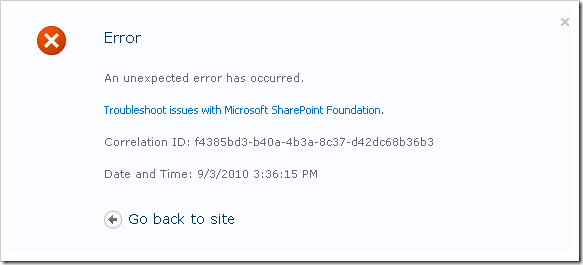
In SharePoint 2010, you’ve got some new capabilities for error reporting and logs. One of the most noted features for me as a developer is that whenever you bump into an error message – you’ll be presented with a correlation ID token.
In this article I will try to explain how you can fetch that token from SharePoint, and also provide a small snippet of code to be able to build your own “Log Searcher Web Part” for your administrators.
What is a Correlation ID in SharePoint?
In SharePoint 2010, you get a Correlation ID (which is a GUID) attached to your logs/error messages when something happens. This ID can then be used to lookup that specific error from the logs.
This Correlation ID is used per request-session in SharePoint 2010, and if you are in the process of requesting some information from SharePoint and bump into some problems along the way – your Correlation ID will be the best starting point for searching for what went wrong along that request!
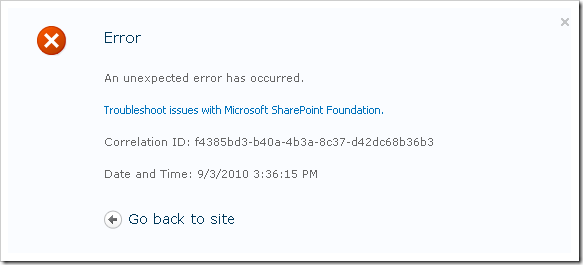
You might get an error message like this in SharePoint 2010 (don’t worry, if you haven’t seen one like this one yet – just hang in there, sooner or later you will ;-)
Search for the log messages based on the Correlation ID token
So if you’ve gotten such an error message and want to find out more information about the actual error and don’t have the time to go around poking in the logs and searching – there’s a few methods you can do this rather easily, as described below.
Using PowerShell to lookup a log message based on Correlation ID token
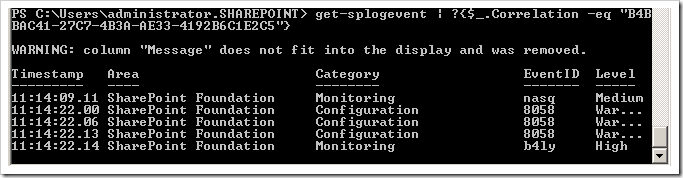
One of the quick-n-awesome ways to do this is to simply hook up a PowerShell console (SharePoint 2010 Management Shell) and then just write the following command (replace the with the Correlation Id):
get-splogevent | ?{$_.Correlation -eq "GUID" }
This will give you the details about your specific error like this in the console:
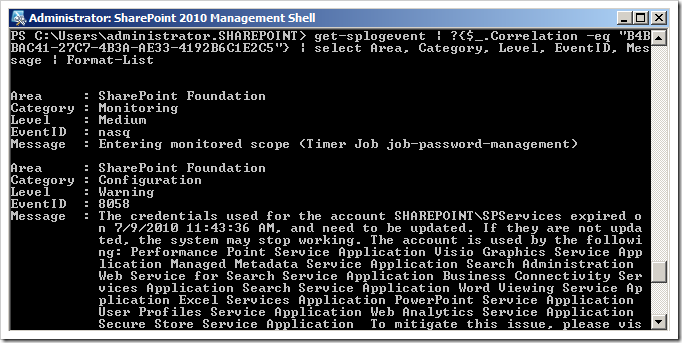
You might want to be more precise and get more specific details out of your query, then you can try something like this:
get-splogevent | ?{$_.Correlation -eq "GUID"} | select Area, Category, Level, EventID, Message | Format-List
This will give you the details about your specific error like this with some juicy details:
Finally if you would want these messages to be put into a text or log file instead, you could just add the classic “> C:Awesome.log” after the command like this:
get-splogevent | ?{$_.Correlation -eq "GUID"} | select Area, Category, Level, EventID, Message | Format-List > "C:\Awesome.log"
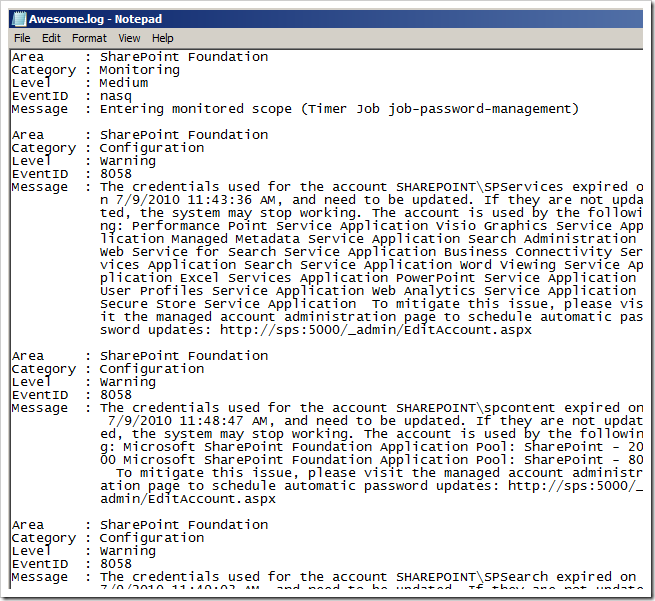
On MSDN they have an overvoew of using SP-GetLogEvent which I would recommend!
Using SQL queries to find log message based on Correlation ID token
You can utilize the SQL logs database to fetch the specific error message based on Correlation id as well. In your logging DB (usually called WSS\Logging, but can be called something else if you’ve changed it) there is a view called ULSTraceLog which you can query with a simple SQL query and fetch the results.
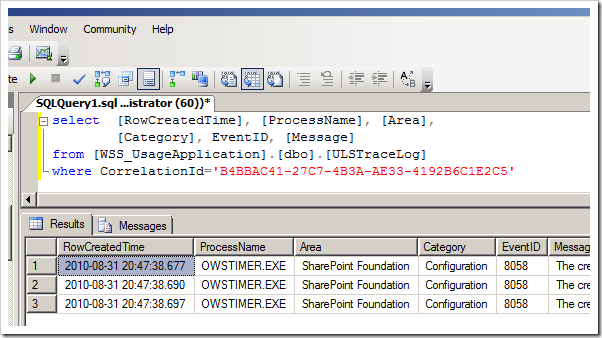
I’ve created a query to fetch the items from the logging database like this:
select [RowCreatedTime],[ProcessName],[Area],[Category],EventID,[Message]
from [WSS_UsageApplication].[dbo].[ULSTraceLog]
where CorrelationId='B4BBAC41-27C7-4B3A-AE33-4192B6C1E2C5'
This will render your results in the SQL Query window like this:
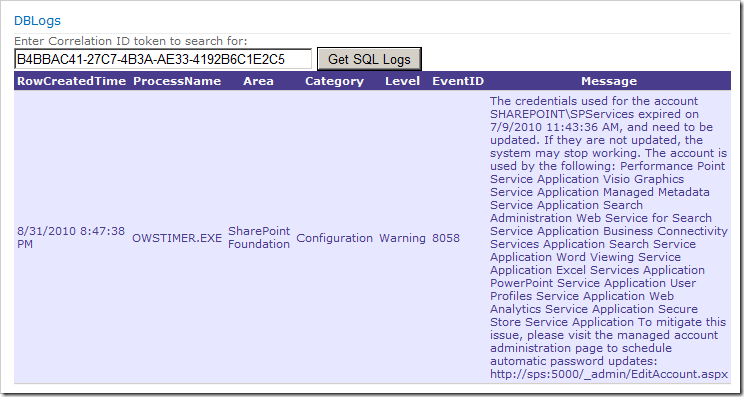
This can of course be implemented in a Web Part for your convenience as well (I’ve created a bunch of diag. and logging web parts that I’ve got deployed to Central Admin) that could look like this (this way you don’t need physical access to the ULS logs all the time, but can do a quick lookup from the web part):
Get the current Correlation ID by using code
I got this piece of code from my good friend Wictor’s blog post. Thanks Wictor – this made my Logging-project more satisfying!
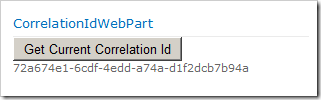
With the following code you can fetch the current Correlation Id of a request.
Create a method (in my case called GetCurrentCorrelationToken()) to wrap up the functionality of returning the current token like this:
public class CorrelationId
{
[DllImport ("advapi32.dll")]
public static extern uint EventActivityIdControl(uint controlCode,refGuid activityId);
    publicconstuint EVENT_ACTIVITY_CTRL_GET_ID = 1;
    publicstaticGuid GetCurrentCorrelationToken()
    {
        Guid g = Guid .Empty;
        EventActivityIdControl(EVENT_ACTIVITY_CTRL_GET_ID, ref g);
        return g;
    }
}
Then from wherever in your code you can simply call it by using this approach:
protected void Button1_Click(object sender, EventArgs e)
{
    Label1.Text = CorrelationId.GetCurrentCorrelationToken().ToString();
}
(Normally you might want this in a try/catch statement or something like that)
Summary
This article should give you (administrator and developer) an insight in how you easily can track the specific errors your users encounter in their/your application(s). If a user gets an error message in SharePoint 2010, they’ll also see the Correlation ID.
If you can train your users to write down that Correlation ID along with a few simple steps on how the error might have been occurring, you’re going to have a much easier way to find the details about that specific error than ever before.
Enjoy!


Comments are closed
Archived comments
Alternatively you can get the correlation id from the response headers:
string correlationId = Response.Headers["SPRequestGuid"];
Hi Stevekay72,
Thanks for the tip - I may just have to update the article to include that information. Great tip!
Cheers,
Tobias.
I can't take all the credit for the information, a good friend and colleague of mine, Jaap Vossers, reminded me of the fact that it is in the response headers.
Brilliant. Send my regards to Jaap and tell him to practice his beatboxing until next time!
Good stuff. Any chance you could post a link to the WSP for the SQL query web part shown above?
Jacob,
Glad you liked the post. I don't have that sample project anymore unfortunately. Just rip the code from the article and create your own Web Part and you'll be on your way.
Cheers,
Tobias.
Awesome. Thanks for your help. I got what I wanted.
Great, I'm glad it could help you Mfpeera :-)
Just what I have been looking for,
Thanks for this post, I'm to lazy to write the web part myself however. Can you export your wsp and I'll send you a donation via PayPal?
Hi bobe2,
Sorry, that's not how I roll ;-)
Actually I'm not sure that I've got the source code accessible at this point, it may be on my offline archive. However using the small code snippets above you'd be able to code this up in an instance yourself.
Cheers,
Tob.
okay, will do thx for the reply!
just sayin' :
if the command is to long to execute, you can restrict the search by using :
get-splogevent -starttime "some min before my error" -endtime "some min after my error" | ?{$_.Correlation -eq ""} | select Area, Category, Level, EventID, Message | Format-List
the PS scripts work great, but I cannot find a view called ULSTraceLog in my WSS_Logging DB.
Never mind... after installing the SharePoint Administration Toolkit, the ULSTraceLog view was created :)
Glad you sorted it out quickly.
Cheers,
Tob.
Hey cbower,
I don't believe you actually need the toolkit, just to turn on the ULS diagnostics job and run it (I believe it's disabled by default). Some handy PS:
$ulsJob = (Get-SPTimerJob | ?{ $_.Name -match "job-diagnostics-uls-provider" })
Enable-SPTimerJob $ulsJob
$ulsJob | Start-SPTimerJob
And in a few minutes, you should have the correct views.
Note the job by default only grabs trace items above a certain level - I think Monitoring by default, but I don't recall. It's also not particularly easy to change that level.
Cheers,
Gavin
hi,
I am getting a following corelation id error, anybody knows wht this means..?
Correlation ID:
040a7d9c-e301-5047-a696-e1215b1d878c
Hi Shweta,
A CorrelationID is a unique ID that is generated for your specific request, so there's really no way for anyone outside of your server farm to know that.
However, the article does talk about how to find the information based on a CorrelationId, so if you know the ID you know what to filter the logs by and can therefore find it easier.
I hope this helps.
Regards,
Tobias.
I dunno Tobias, that one looks a bit familiar... ;)
Come on now AC, don't feed the trolls ;-)
Correlation ID:
c5c65fce-31d4-48c8-8ab4-2e86c817e6ed
Please let me know ASAP
Adithya,
Nobody else can identify your problems based on the Correlation ID from remote locations unless we have access to your SharePoint environments. These ID's are uniquely generated per-request and hence doesn't exist anywhere else than in your specific environment.
What I would suggest is that you read the article here and choose one of the alternatives for reading the error messages associated with the correlation ID.
Cheers,
Tobias.
I m getting the same errors you are discussing about in this article:
The SharePoint Foundation Error and the OWSTIMER.EXE Error in my Logs.
Could you please help me in solving it please.
Hi Mark,
I'm discussing options for troubleshooting your errors. You would want to try one of the methods to see if you can get more detailed error messages from the ULS logs.
A pro tip is to use the ULSViewer (google it) and simply review your logs in real time while you get your errors.
That's where I'd start.
Then use this article to learn how to dig deeper and find specific error messages related to a specific correlation Id.
Thank,
Tobias.
I used your screenshot at http://styrheim.wiki-site.c... - hope you don't mind.
Hi Jan,
No problem mate, sources are attributed :)
Tobias.
Awesome post.
Thanks a lot!
Glad you liked it :-)
Tobias.
Thank you so much for the article.. But when I try this with the correlation ID, it's returning nothing?? Any idea? When I try with *.txt file, it's just creating the blank file??
Thanks,
Justin
Hi Justin,
If you use ULSViewer to review the logs, can you find the Correlation ID then?
Regards,
Tobias.
Hi Tobias,
Thanks very much for your reply. In my case, Sharepoint is running in a remote server and I don't have permission to install ULSViewer in the server. I'm getting the Correlation ID from the page and I got access to the server to see the log folder. Is there any other way to search the correlation ID in log folder?? I changed the directory to the log folder in the server. But still returning no result. I tried with wrong syntax and I'm getting errors. Is there any other place where it save the output?? I tried with *.txt file as you mentioned in the post, but it's creating blank file? Is it something related to permissions??
Thanks,
Justin
If the commands you execute doesn't return anything in the actual query, then the textfile will be blank as well of course.
You can download the latest version of ULSViewer with which you can map your log-folder on the server. Even if you can't install it on the server (which you shouldn't anyway) you can execute ULSViewer from your own computer but select the LOGS-folder from the server if it's shared with you.
Regards,
Tobias
Thank you Tobias :) Will try this and update.. You are awesome!!
Cheers Justin
You missed the ? (Where-Object) on your code lines
Thanks, good catch. When I migrated my blog from the previous blog host, most of the code syntax highlighting broke. Still some instances of that, as you encountered. Hopefully it should reflect the proper syntax now :-)
Hi, I have a problem with Merge-splogfile command. when I execute that command for collecting the log from my servers, it creates on job under the name collection of log files from server ??? and stuck on running for ever!!!! this command doesn't finish.
Hi , from yesterday am in trouble to find exact log file using correlation id and log id ..there are 100s of log file created for particular day but i want exact file which has that correlation id.. Is there any ways to find it please help!!
Hi @nivethaelango:disqus ,
What have you tried so far?
Did you try to use the PowerShell cmdlets to extract and search for logs?
Did you try to look through the DB using the query examples above?
If you have done none of the above, have you tried parsing the log files or searched through them using a simple tool like Baretail, that offers quick search and log trailing?