In SharePoint 2010, you now can use LINQ syntax to fetch items from your lists instead of using the “traditional” approach of CAML queries. (Including SPSiteDataQuery and SPQuery objects)
In this article, I will give you a brief introduction to how you can get started using LINQ queries in SharePoint, also known as LINQ to SharePoint.
Basics of LINQ?
As a prerequisite to this article, I’m going to imply that you know what LINQ is and how to write basic LINQ queries in any .NET application already. I’m not going to dive into the details about LINQ or the syntax itself here – please see MSDN for that!
LINQ to SharePoint!
In order to work with LINQ in SharePoint 2010, we need to use a tool called SPMetal.exe which resides in the 14bin folder. This tool is used to generate some entity classes, which Visual Studio 2010 can use to get IntelliSense, and allows for LINQ-based queries to be performed on your lists.
Noteworthy:
- LINQ to SharePoint queries are translated to proper CAML queries
- CAML queries are, in turn, later translated to SQL queries
SPMetal.exe
Using the tool called SPMetal, we generate our entity classes needed to perform these object-oriented queries toward our SharePoint server.
These are the required steps to get hooked up:
Launch a cmd-window and navigate to C:\Program Files\Common Files\Microsoft Shared\Web Server Extensions\14\bin

Navigating to the SharePoint binary directory in a SharePoint server environment.
Run the following command to utilize the SPMetal.exe tool with the following syntax:
SPMetal.exe /web:[http://yoursite](http://yoursite) /code:C:\YourEntityFile.cs
Example:

Run the SPMetal.exe command
Now navigate to C:\ (or wherever you chose to output your file) and make sure the file has been generated:
Open up the file and take a look at the content that SPMetal now has provided us with:
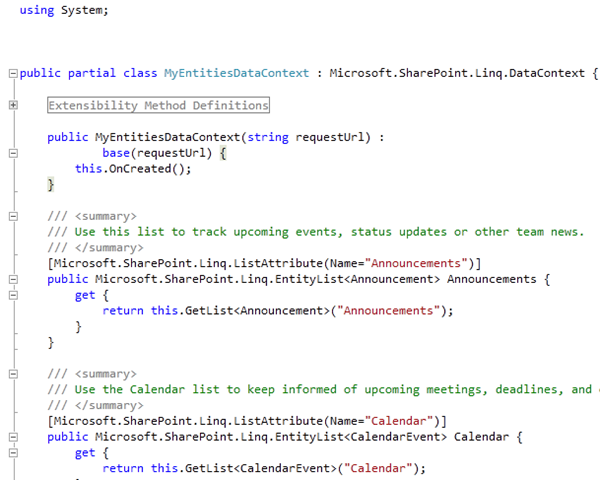
Verifying that SPMetal has created the files we need.
Note that the class name is now MyEntitiesDataContext. It’s based on the name you specify as your code file in the SPMetal.exe command-line tool. If you were to use /code:C:\Awesome.cs instead, it would generate a class called AwesomeDataContext.
With that done – all we need to do is import it to one of our projects and use it!
Visual Studio 2010 – Let’s create a sample Web Part that utilizes LINQ to SharePoint
In this sample, I will create a simple Web Part that will use LINQ to SharePoint syntax to fetch some information from the Announcements list. A basic sample I use in my training classes as well, and should be reasonably easy to grasp!
- Create a new project (I’m going to create a new Visual Web Part project)
- Import your DataContext-file by choosing your Project -> Add -> Existing Item:
- Specify your file (mine is called MyEntities.cs):
- Make sure it’s properly placed in your project structure – then we’re good to go:
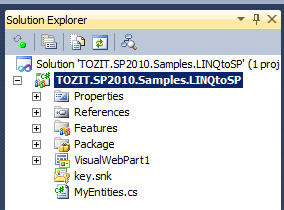
Example project structure for a LINQ to SharePoint project, generated using SPMetal
Thus far, we have created an entity file using SPMetal.exe, and now we have successfully imported it into our project.
Add proper references
Now to use LINQ to SharePoint, you also need to reference the Microsoft.SharePoint.Linq assembly. Point to references, right-click and choose “Add Reference” and select the Microsoft.SharePoint.Linq.dll file:
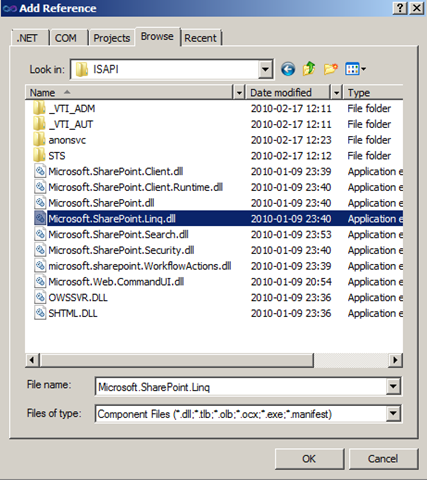
Referencing the Microsoft.SharePoint.Linq.dll assembly to allow working with LINQ to SharePoint
In your code, reference the assemblies:

Ready to code?
What you should’ve done up until now is this:
- Generate your entities using the SPMetal.exe tool
- Reference the newly created file from your SharePoint project
- Make sure you’re using the proper references for System.Linq and Microsoft.SharePoint.Linq
- Be ready to code :-)
Code!
In my example, I will have a Visual Web Part that will use LINQ to SharePoint to fetch all Announcements from my Announcement-list and work with those results. If you want to see the entire project, look at the bottom of this article, where you can download it.
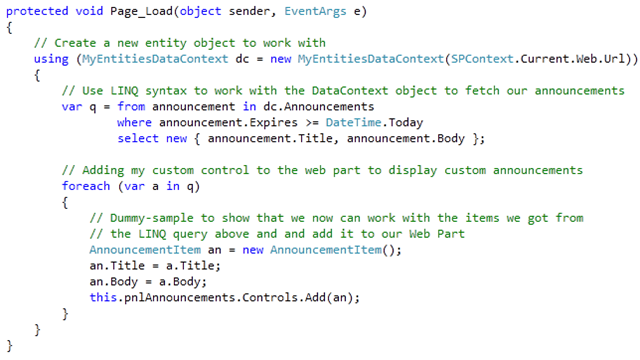
Example of using LINQ to SharePoint to retrieve announcements from a SharePoint site.
IntelliSense!
While you code your queries using LINQ to SharePoint, you will now have access to IntelliSense, which you did not have with CAML queries:
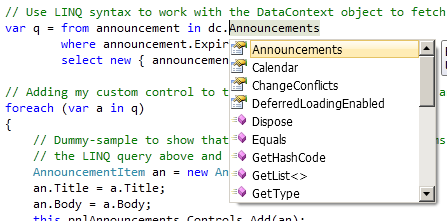
Showing the IntelliSense dialog when coding with LINQ to SharePoint.
I’m going to leave it at that – very (very) easy to get started with LINQ to SharePoint, and all you really need to know is to start using the SPMetal tool to generate your entity classes and hook’em up with Visual Studio to start coding.
Summary
As you can see, there are not a lot of things you need to do in order to work with LINQ in your SharePoint applications with your SharePoint data.
I’ve been pinged plenty of times on how you can get started with this, and there you have it. More in-depth articles to come later – this is just to get your wagon rolling!
Update: The download for this project no longer exist. It has been deprecated.
Enjoy!


Comments are closed
Archived comments
Download link is broken?
Kristopher ,
The download link broke when I migrated from the old blog. Just follow along with the article and you'll have the exact same result as if you were to download the sample project.
Cheers,
Tobias.
when i run the spmetal.exe am getting one error like must specify the souce code language..please resolve this issue..
Hi Mahaa,
Do you mind providing more details to the matter? There's a bunch of switches you can use when executing the command line tool.
Cheers,
Tobias.
Thank you Zimmergren
You're most welcome.
Did you sort it out yet? Otherwise try attaching screenshots and logs of the errors.
Cheers,
Tobias.
Does the work with a remote c# application, or does it need to be on the sharepoint server?
Hi Richardscannell,
In order for you to work remotely you'll need to either utilize something called the Client Object Model (link: http://zimmergren.net/techn... or you'll have to use Web Services.
Using the client object model you can create linq-queries as well, but not in the same manner as you do with the server-side LINQ model. Check this out for more details on client-side coding for SharePoint: http://msdn.microsoft.com/e...
Thanks a lot for sharing this Article.its really good for beginners who wants to use LINQ in SHAREPOINT 2010.
Cheers mate.
i am facing a problem with my linq code,It gets executed when a person has full control.
Please elaborate a bit more. Perhaps you'll need to elevate the privileges of your executing code using the SPSecurity.RunWithElevatedPrivileges() method?
Download link not working Tobias.
Thanks,
-Ted
Hi Ted,
Thanks for the heads up. Unfortunately I lost the files when I migrated my blog to the new platform. I forgot to copy the downloads-directory ;-)
Regards,
Tobias.
Its a nice article very nicely explained especially for beginners like me.Is there another way to have a look at the code or a download link.
Thank you. Unfortunately I lost the files when I migrated my blog to the new platform, so you'll have to reproduce the steps instead.
Cheers,
Tobias.
thanks man for sharing this kind of information and knowledge, Im a asp.net developer and Im trying to do something on Shsrepoint, This article hepls me a lot to understand and improve the linq functionality in my project.
Hi Sebastian,
Thank you for your comment - I appreciate it, and I hope you're on track in your endeavours to learn SharePoint :-)
Thanks for your article. But when i try this, i met an error message: System.InvalidOperationException: The query uses unsupported elements, such as references to more than one list, or the projection of a complete entity by using EntityRef/EntitySet.
Nice article, quick question to see if what I'm trying to do is possible. I have a formView to display an item from a sharepoint list. I've used a LinqDataSource control to query my DataContext and then I display the information returned in the formView.
However, I'm now trying to perform an update using the formView edit template and I keep getting an error when I click update. (The data context must extend DataContext when the Delete, Insert or Update operations are enabled). Is what I'm trying to do not possible? I'm guessing the error is down to my Linq to Sharepoint datacontext extending Microsoft.SharePoint.Linq.DataContext and not System.Data.Linq.DataContext?
Thanks,
Shaun
Hello thanks for posting but I haven't been able to run this. From where pnlAnnouncements comes from? it is not recognized in my code. Also, AnnounmentItem. I will appreciate your help. Thanks
Hi Maggie,
The AnnouncementItem is a class I created myself just for the sample. You can see in the code that what you really need and want is the a.Title, a.Body and so on. The pnlAnnouncement is an ASP.NET Panel in my Visual Web Part, something you'd have to add yourself to your control :-)
I hope that helps.
Tobias.
Thanks a lot for answering, it did helped.
I dragged the panel on my visual web part and gave it this id: 'pnlAnnouncement' but it's still not recognized in my Page_Load function.
I try to google this but I'm afraid I'm not using the correct words. If you will want to find information about this, what will you type in google?
Thanks again Tobias
Your posting is excellent, very well organized.
Hi Maggie,
I'd suggest looking up how to add web controls to an ASP.NET web form. That's essentially what we're doing here.
Cheers,
Tobias
Thanks again Tobias
I am developing a SilverLight Web Part for SharePoint 2010 in C#. I have
made a LINQ to SQL connection, and it works when I lunch the
SilverLight alone.
When I lunch SilverLight as a Web Part in SharePoint it does not work.
What am I doing wrong?
Hi Solo,
That all comes down to what your code looks like of course - if you can paste the code somewhere I might be able to find out, but without the code there will be little success :)
Thanks! This post was very helpful!
Hi Laura and thank you.
Cheers,
Tobias.
Hi Tobias your article is very Good.. How to use lookup columns in entity class.. Could you help help me please ASAP
Hi,
I'm new to Sharepoint codding, and I have a task to write a programm to get versions of every item in one of my lists(info should go to file). I managed to write a code, and it seems to be right. Question is what type of Visual Studio prject shoud I use to get it working, and what are my possible options?
Regards
Hi Taras,
My first counter-question would be: If you already got it right and have the code written, don't you also have a Visual Studio project for that?
Choosing VS Projects are always based on your requirements of course, so if you have any specific requirements for how it should work - line them up and I can direct you in the proper direction :-)
Cheers,
Tobias.
I mean I got a logic for getting info I need form my site and pushing it into file. I'd like it to be a console app that I would shedule to run once a day. Please let me know if may need any other details.
Thanks
For any scheduled iterative code, I would consider creating a Timer Job. Check out my mate AC's article here: http://www.andrewconnell.co...
nice article... if possible give some examples with join's
Hi Sandeep,
There's a lot of different samples around the web. One of the first hits on Google gives http://www.nullskull.com/a/...
Cheers,
Tobias.
Thanks, Its works for me
Cheers, glad I could help.
How to get all BlogPosts with comments, posts, etc from a sharepoint site
Hi "test",
Well, that depends on what you want to do, where you want to display them, how you want them presented etc. What's the goal?
Cheers,
Tobias.
Hi, I am new to SharePoint coding. I have created MyEntities.cs using SPMetal.exe. I want to access a particular list from a sub site in the main site. Kindly help me to find solution....
Hi Mohammed,
Hard to say without knowing your code mate.
Additional resources that are worth checking out if you are getting started:
How to use LINQ to SharePoint: http://www.codeproject.com/...
Best Practices with LINQ to SharePoint: http://blogs.msdn.com/b/oca...
Honestly I don't use LINQ to SharePoint very often in my projects anymore - mostly because our development efforts are targeting the App-model and more hybrid solutions for SharePoint and Office 365.
I hope this helps.
Tobias.
Hey, great article! When I need to update the generated file, do I go through the same process (run the SPMetal with cmd?) Thanks :)