Author: Tobias Zimmergren
http://www.zimmergren.net | http://www.tozit.com | @zimmergren
Introduction
Search has always been a great way to create custom solutions that aggregate and finds information in SharePoint. With SharePoint 2013, the search capabilities are heavily invested in and we see a lot of new ways to perform our searches. In this post I’ll show a simple example of how you can utilize the REST Search API’s in SharePoint 2013 to perform a search.
REST Search in SharePoint 2013
So in order to get started, we’ll need to have an ASPX Page containing some simple markup and a javascript file where we’ll put our functions to be executed. The approach mentioned in this post is also compatible with SharePoint Apps, should you decide to develop an App that relys on Search. In my example I’ve created a custom Page which loads my jQuery and JavaScript files, and I’m deploying those files using a Module to the SiteAssets library.
Preview of the simple solution
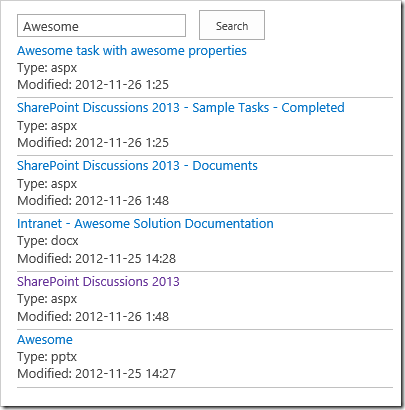
Creating a Search Application using REST Search Api’s
Let’s examine how you can construct your search queries using REST formatting and by simply changing the URL to take in the proper query strings.
Formatting the Url
By formatting the Url properly you can retrieve search results pretty easily using REST.
Query with querytext
If you simply want to return all results with no limits or filters from a search, shoot out this formatted url:
[blockquote]http://tozit.dev/_api/search/query?querytext=’Awesome’[/blockquote]
will yield the following result:
[![image_thumb[1]](/co![image_thumb[1]](https://zimmergren.net/content/images/2012/12/image_thumb1_thumb.png "image_thumb[1]") et/content/images/2012/12/image_thumb11.png)
et/content/images/2012/12/image_thumb11.png)
Essentially we’re getting a bunch of XML returned from the query which we then have to parse and handle somehow. We can then use the result of this query in our application in whatever fashion we want. Let’s see what a very simple application could look like, utilizing the SharePoint 2013 rest search api’s.
ASP.NET Markup Snippet
As we can see in the following code snippet, we’re simply loading a few jQuery and JavaScript files that we require and we define a Search Box and a Button for controlling our little Search application.
JavaScript logic (RestSearch.js)
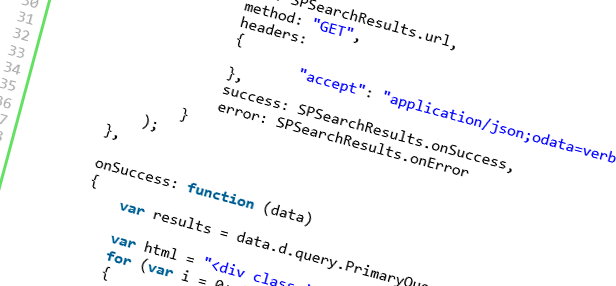
I’ve added a file to the project called RestSearch.js, which is a custom javascript file containing the following code which will perform an ajax request to SharePoint using the Search API’s:
// in reality we should put this inside our own namespace, but this is just a sample.
var context;
var web;
var user;

// Called from the ASPX Page
function executeSearch()
{
    var query = $("#searchBox").val();

    // run
    SPSearchResults =
    {
        element: '',
        url: '',

        init: function(element)
        {
            SPSearchResults.element = element;
            SPSearchResults.url = _spPageContextInfo.webAbsoluteUrl + "/_api/search/query?querytext='" + query + "'";
        },

        load: function()
        {
            $.ajax(
                {
                    url: SPSearchResults.url,
                    method: "GET",
                    headers:
                    {
                            "accept": "application/json;odata=verbose",
                    },
                    success: SPSearchResults.onSuccess,
                    error: SPSearchResults.onError
                }
            );
        },

        onSuccess: function (data)
        {
            var results = data.d.query.PrimaryQueryResult.RelevantResults.Table.Rows.results;

            var html = "<div class='results'>";
            for (var i = 0; i < results.length; i++)
            {
                var d = new Date(results[i].Cells.results[8].Value);
                var currentDate = d.getFullYear() + "-" + d.getMonth() + "-" + d.getDate() + " " + d.getHours() + ":" + d.getMinutes();

                html += "<div class='result-row' style='padding-bottom:5px; border-bottom: 1px solid #c0c0c0;'>";
                var clickableLink = "<a href='" + results[i].Cells.results[6].Value + "'>" + results[i].Cells.results[3].Value + "</a><br/><span>Type: " + results[i].Cells.results[17].Value  + "</span><br/><span>Modified: " + currentDate + "</span>";
                html += clickableLink;
                html += "</div>";
            }

            html += "</div>";
            $("#searchResults").html(html);
        },

        onError: function (err) {
            $("#searchResults").html("<h3>An error occured</h3><br/>" + JSON.stringify(err));
        }
    };

    // Call our Init-function
    SPSearchResults.init($('#searchResults'));

    // Call our Load-function which will post the actual query
    SPSearchResults.load();
}
The aforementioned script shows some simple javascript that will call the Search REST API (the “_api/…” part of the query) and then return the results in our html markup. Simple as that.
Summary
By utilizing the REST Search API we can very quickly and easily create an application that searches in SharePoint 2013.
This can be implemened in SharePoint Apps, Sandboxed Solutions or Farm Solutions. Whatever is your preference and requirements, the Search API’s should be easy enough to play around with.
Enjoy.


Comments are closed
Archived comments
Awesome stuff! Thanks for sharing!
Cheers.
Interesting one, I really like your way of presentation. Thanks for sharing.
Hi Rajesh,
Thank you for your kind words, I appreciate it.
Cheers,
Tobias.
Worth reading thanks for the share!
Cheers
Thank you for your comment Steve.
Cheers,
Tobias.
thanks for this!
Cheers,
Tobias
Great Post! Do you know how to limit the search to a specific site collection?
Hi, thanks, what about if I create a aspx page on my project completely on other domain?
Hi Kourosh,
I think you'll have to elaborate your question a bit more :-)
Hi, I used this query to get all documents (among others) containing a word which starts with tes, however it does not any document at all. But when I enter tes* within the search box it returns all documents which starts with tes for example test2 or testing..
here is my query._spPageContextInfo.webAbsoluteUrl + "/_api/search/query?querytext='tes*'
How would you format a query to retrieve all the people who report to a given person?
Depends on how you want to achieve it. Through user profile properties, through search (e.g. if you have an employment directory that is searchable) etc. I've done a similar solution, where the information has been stored in the user profile properties, and just executed a CSOM/REST call to fetch the information from the profiles.
More on CSOM and User Profiles can be found here: http://msdn.microsoft.com/e...
Cheers,
Tob.
Thanks for sharing..But does it work for special character as well..
If the query text contains special character it throws an error
"The query string "querytext" is missing or invalid.".
I tried encoding it..but still no luck.
Any clue how to fix it?
Hi Swati,
Can you please elaborate what your query string looks like, and what the special characters are that doesn't work?
Cheers,
Tob.
it doestnt work with # ,& and many other symbol.
Query is as following
var Department = "some text with special characters"
querystring = _spPageContextInfo.webAbsoluteUrl + "/_api/search/query?querytext='Department:" + Department + "';
I have done a Quick fix by replacing these characters with respective encoded value..but I am looking for a generic solution which works fine with all special characters.
Hi Swati,
Well if it's in your query string in javascript, I'm pretty sure you'd need to escape the characters as they might otherwise break the actual HTML and script markup.
You could of course create a generic function for replacing special characters automatically, but I think that's on you and not SharePoint.
Regarding the special characters, how to handle the double quote symbol " in REST-based web services? Will " be treated as noise word and ignored or will be treated a word in SP2013 search?
I have a search application for company stock products search. There are a lot of product descriptions which contains " and -, such as 1/2", 3/4, 1-1/2" Hex Cap Screw. How can I config the search to return the correct search results?
Is there any way to set up scope for results, let say I want to get results only from particular web or from particular list. And also can it use for search taxonomies, normally api returns GUID for Taxonomies
Hi Tobias,
Can use the same thing in the HTML page out side the SharePoint Farm.
Just to give background we are planning to replace 3rd party search tool with the sharepoint fast search and planning to use the rest api to show the result on the html application.
hi Tobias,
thanks for the article.
i have a requirement in which i need to implement search from the sub site ONLY. this sub site is being passed as a query string and in the search center site collection page there is a search box web part with button , when i enter the keywords and click on search i need to pass this sub site as a parameter along wit the keyword. and i need to show the results in the OOTB core results search web part.
Can you help me here , how to proceed with this? should i implement search api here?
since the sub site name is dynamic, any option of using/leveraging OOTB searchw eb parts in sp 2013 is ruled out?
help is highly appreciated!
Hi,
I need to fetch sharepoint search result and show it on PHP application . for that i am using REST API. Unfortunely i am facing below error. I noticed that this is because of permission. How to resolve . Please help me .
{"readyState":0,"status":0,"statusText":"No Transport"}
Hi Bala,
I think that question is best suited for the official MSDN Forums: www.mssharepointforums.com
Cheers,
Tobias.
Hi Tobias,
I got the same error which Bala mentioned above. And you have also provided one link but in that link we could not find the solution. So please can you provide the exact solution url.
Regards,
Manoj
Hi Manoj,
Did you post a question to the forum as I mentioned above?
What's the link to your question?
Thanks,
Tobias.
Hi Tobias,
I have put the issue in the Forum with title "Share point access using search API"
Link - https://social.msdn.microso...
Please help
Regards,
Manoj
Hi Manoj,
Great - I'm sure there'll be people able to assist in the forums. If not there's also StackExchange which has a lot of users in the SharePoint forums to help out.
Cheers,
Tobias.
Hi,
Please find the link -
https://social.msdn.microso...
Regards,
Manoj
Hi Tobias,
Please let me know how to set proxy in your code given above. Because I am not able to access that url directly. That is why need to set proxy.
Regards,
Manoj
Hi Manoj,
Please refer to the MSDN or StackExchange forums for that mate. I'm sure there's plenty of people to help out who may have more time on their hands than I currently do.
I hope you get it resolved!
Tobias.
Hi, I try to create a html page and using your code, once the script is run, then the error is shown: {"readyState":0,"status":0,"statusText":"No Transport"}
does the script run in SharePoint page?
Hi,
Is it possible to include user profile properties as well in query? Like Department?
I am trying to fetch tasks and I am getting values from task item, but all user profile properties are null in search result (although there are value if you search for an user)
Hi,
I have been using your potential code snippet to use search functionality.
Currently i need to search the documents inside one single site but this api returns the search result for across all the sites.
Is there any workaround for this?
Hi Rahul,
You could use the path keyword in the query as such:
http://localhost/_api/search/query?querytext='test path:http://localhost/subsite/
Check out this question on StackExchange which has covered it: http://sharepoint.stackexch...
Hi Tobias,
We have been using search rest query extensively. No the issue is with the help of rest query we are fetching publishing content of appx. 200 results. And content being large enough is making Post data heavy enough. So, is there any way so that we can get particular characters of data in search results. .
Thanks in advance.
Hi Tobias,
I Want to search specific doument library using sharepoint search rest API.Please help me
Thanks in Advance
Murali M
http://server/_api/search/query?query_parameter=value&query_parameter=value
http://server/_api/search/query(query_parameter=value&query_parameter=)
Great article, thank you for putting this together. FYI -- I recommend checking your font on Chrome, it's a bit difficult to read.
Hey @jparlay:disqus , thanks for your comment.
I realize now that when migrating this blog to a new platform, it looks like the formatting of the code in this post has been lost. I'll try to address that immediately.
Do you also experience that the normal text is hard to read, or was it mainly the code block? (I'm also on Chrome, and my experience seems to be fine - but I'd like to double check :) )
Alright @jparlay:disqus I have updated the code block now with the original code from my github repository. It should be easier to read at least that part. Sorry for the messy formatting :)
No worries Tobias, migrations can be thorny. However, it wasn't the code block that is giving me trouble. See attached. It's beautiful,
just not super easy to read for me https://uploads.disquscdn.c...
Chrome (left) vs. IE (right) to show you a bit of what I'm experiencing. Hope this doesn't come across as negative -- I love the blog and just trying to help :) https://uploads.disquscdn.c...
Hey @jparlay:disqus thanks for sharing!
Unfortunately I can't reproduce it on my box. I'm on the latest incarnation of Chrome and I have pretty good sharpness here on both my laptop monitor and the bigger desktop monitors.
Thanks for the heads up though, I will investigate further and see if I can align it better across browsers.
Cheers,
Tobias
Hey Tobias, I have been following your posts since past few years. Thanks a ton for sharing this.
Hi.
Thanks for the comment, I appreciate that. I am glad the post helps :)
Tobias